Rich Web-based Applications

Term “Rich Internet Applications” (RIAs) from “Rich Web-based Applications” (RiWAs)…

A rich Internet application (RIA) is a Web application designed to deliver the same features and functions normally associated with desktop applications.Rich Web-based Applications: An Umbrella Term with a Definition and Taxonomies for Development Techniques and Technologies.

Key features of RiWAs, which make them more advanced than the standard web-based applications.


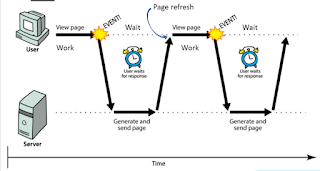
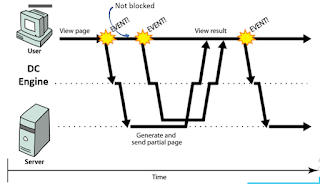
Rich GUIs in RiWAs use Delta-Communication to communicate with the server components         •DC happens behind the GUI :- Eliminates page refreshes          

•DC can process asynchronously :- Eliminates page freezing          

•DC works faster :- Eliminates the work-wait pattern


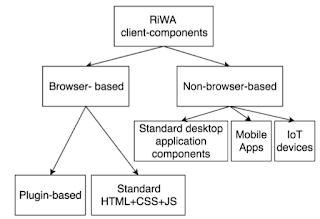
Different technologies and techniques used to develop the client-side components of the RiWAs, explaining their use in dedicated environments.

Simple-Pull-Delta-Communication (SPDC) can be seen as the simplest form of DC 

           •Used in AJAX 

           •Single XHR request to the server 

           •Client-side: Native JS support 

           •Server-side: special technology is not need.

•Pollingis used to simulate data-push 

•Send XHR requests periodically to the server 

•Client-side: Native JS support 

•Server-side: special technology is not needed 

•Can increase network traffic (less scalable) 

•Blank responses can waste resources

•Cometis used to simulate data-push

•Long-lived XHR requests

•Client-side: Native JS support

•Server-side: Need a streaming server. Special technology is not needed, can be implemented with standard web technologies

•Reduce network traffic than polling (more scalable)

•Blank responses are eliminated

•Server-Sent-Events (SSE)is used (only) for true data-push 

•Similar to Comet, but no client requests 

•Client-side: HTML5 provides native JS support 

•Server-side: Need a streaming server. Special technology is not needed, can be implemented with standard web technologies 

•Reduce network traffic than polling/Comet (more scalable) 

•Blank responses and requests are totally eliminated

•WebSocket(WS)is bi-directional 

•Supports both data-pull and true data-push 

•Client-side: HTML5 provides native JS support Server-side: Need a WS server. Complex. 

•Reduce network traffic than polling/Comet/SSE (highly scalable, 10CK is addressed

What Delta-Communication is, discussing the advantages of using it. 

Provide local, long distance, data, and Internet telecommunications services to residences and businesses in Southern Illinois. It offers service plans, which include mobile, dial up and high speed Internet, and telephone systems.
The major advantages are:-Delta modulation provides the benefit of lower bandwidth consumption because data transmitted as only one bit per sample.Lower bandwidth makes the process of data communication more cost effective.

The history and the evolution of the XHR and AJAX

XHRTake an application like Instagram or Pinterest for example.How is it that I can continue scrolling forever and ever, without a page reload, and content continues to show up? What’s happening behind the scenes is this asynchronous request to a server that does not end up disturbing the user? Around 2005 (when the term AJAX was coined), this was pretty revolutionary. Since then, new technologies have been built on top of older ones to create a more useful, faster web.

AJAX
In some ways it has. During the first big stretch of browser innovation, Netscape added a feature known as LiveScript, which allowed people to put small scripts in web pages so that they could continue to do things after you’d downloaded them. One early example was the Netscape form system, which would tell you if you’d entered an invalid value for a field as soon as you entered it, instead of after you tried to submit the form to the server

.

LiveScript became JavaScript and grew more powerful, leading to a technique known as Dynamic HTML, which was typically used to make things fly around the screen and change around in response to user input. Doing anything serious with Dynamic HTML was painful, however, because all the major browsers implemented its pieces slightly differently

Client-side development 1 – jQuery

Is jQuery a framework or a library?

Framework and libarry are not necessarily mutually exclusive terms. Framework is typically a libarry or a collection of libraries.

Strictly speaking, jQuery is a library, but, to an extent, it does meet the definition of a software framework. Although many would argue that jQuery doesn’t meet the definition of a software framework strictly enough, the fact is that no other JavaScript framework fully meets the definition of a framework either.

One of the defining characteristics of a software framework is that its code is protected from modifications. In JavaScript, this clearly isn’t the case. Any libraries or frameworks that can be called into your client-side code are modifiable, although it would be against best practices to alter them. Therefore, if it is permissible to call Bootstrap or AngularJS a framework, there is no reason why jQuery cannot be called a framework either. 

Perhaps the best explanation of why jQuery is more of a framework than a library is the fact that as a developer, you can chose not to use any of its framework-like functionalities. You can, for example, mix a simple jQuery statement with a standard JavaScript statement on the same line. AngularJS and Bootstrap typically don’t allow you to do this. Therefore, the accurate answer whether jQuery is a framework or not is “it depends whether you chose to use it as a framework or not”.

jQuery Features

Helpful utility functions galore

At its core, jQuery is meant to make a developer’s life easier by combining and simplifying critical syntax you would need to write out in JavaScript. It does this through an assortment of helpful utility functions that you can call upon during development.

CSS3 Selectors

When working with CSS code, selectors are patterns that can be called upon to style a particular page element.

The CSS3 selector is a new specification that will be used heavily in the future. A majority of sites are already making use of them.

You might be interested to know that one benefit of working with jQuery, is that you can also use CSS3 selectors in your production code. This just means increased support for you and more ways to create page elements and modern designs.

jQuery Plugins

One of the added benefits of jQuery is that the team behind it has kept the core package tight and focused, remaining devoid of non-essential features. However, because of this they’ve also made sure that it’s extensible. It comes with a framework for extending the library, allowing for the use of something called plugins.

Once you create a plugin in jQuery it can be used across multiple projects. In addition, plugins can be shared with the community similar to WordPress plugins. This, in turn, means that when you start working with jQuery you have access to hundreds – if not thousands – of previously developed plugins to use on your projects. This significantly cuts down development time.

The way jQuery is structured, a lot of common functions and practices have been boiled down into a plugin. This is definitely an intended feature, not a flaw. It primarily helps you keep your syntax and final code bloat to a minimum.

Why? Because plugins can be used on a page-by-page basis instead of across an entire project. This cuts down on unnecessary bandwidth, resulting in increased loading times. It also eliminates some of the bugs or issues you might see across platforms. Finally, it’s just easier to work with and that’s that.

Advantages and disadvantages of using jQuery in different project scales.

The advantages of jQuery

The main advantage of jQuery is that it is much easier than its competitors. You can add plugins easily, translating this into a substantial saving of time and effort. In fact, one of the main reasons why Resig and his team created jQuery was to buy time (in the web development world, time matters a lot).

Another advantage of jQuery over its competitors such as Flash and pure CSS is its excellent integration with AJAX.

  • jQuery is flexible and fast for web development
  • It comes with an MIT license and is Open Source
  • It has an excellent support community
  • It has Plugins
  • Bugs are resolved quickly
  • Excellent integration with AJAX

The disadvantages of jQuery

The main disadvantages of jQuery is the large number of published versions in the short time. It does not matter if you are running the latest version of jQuery, you will have to host the library yourself (and update it constantly), or download the library from Google (attractive, but can bring incompatibility problems with the code).In addition to the problem of the versions, other disadvantages that we can mention:

  • jQuery is easy to install and learn, initially. But it’s not that easy if we compare it with CSS
  • If jQuery is improperly implemented as a Framework, the development environment can get out of control.

The selectors and their use in jQuery

jQuery selectors allow you to select and manipulate HTML element(s).jQuery selectors are used to “find” (or select) HTML elements based on their name, id, classes, types, attributes, values of attributes and much more. It’s based on the existing CSS Selectors, and in addition, it has some own custom selectors.All selectors in jQuery start with the dollar sign and parentheses: $().

THE ELEMENT SELECTOR

The jQuery element selector selects elements based on the element name.You can select all <p> elements on a page like this:

$("p")

Example:- When a user clicks on a button, all <p> elements will be hidden:

Example

$(document).ready(function(){
  $("button").click(function(){
    $("p").hide();
  });
});Try it Yourself »


THE #ID SELECTOR

The jQuery #id selector uses the id attribute of an HTML tag to find the specific element.

An id should be unique within a page, so you should use the #id selector when you want to find a single, unique element.

To find an element with a specific id, write a hash character, followed by the id of the HTML element:

$("#test")

Example:- When a user clicks on a button, the element with id=”test” will be hidden:

Example

$(document).ready(function(){
  $("button").click(function(){
    $("#test").hide();
  });
});Try it Yourself »

THE CLASS SELECTOR

The jQuery .class selector finds elements with a specific class.To find elements with a specific class, write a period character, followed by the name of the class:

$(".test")

Example:- When a user clicks on a button, the elements with class=”test” will be hidden:

Example

$(document).ready(function(){
  $("button").click(function(){
    $(".test").hide();
  });
});Try it Yourself »

MORE EXAMPLES OF JQUERY SELECTORS

SyntaxDescriptionExample
$(“*”)Selects all elementsTry it
$(this)Selects the current HTML elementTry it
$(“p.intro”)Selects all <p> elements with class=”intro”Try it
$(“p:first”)Selects the first <p> elementTry it
$(“ul li:first”)Selects the first <li> element of the first <ul>Try it
$(“ul li:first-child”)Selects the first <li> element of every <ul>Try it
$(“[href]”)Selects all elements with an href attributeTry it
$(“a[target=’_blank’]”)Selects all <a> elements with a target attribute value equal to “_blank”Try it
$(“a[target!=’_blank’]”)Selects all <a> elements with a target attribute value NOT equal to “_blank”Try it
$(“:button”)Selects all <button> elements and <input> elements of type=”button”Try it
$(“tr:even”)Selects all even <tr> elementsTry it
$(“tr:odd”)Selects all odd <tr> elements

IMPORTANCE OF DOM

Web browsers

To render a document such as a HTML page, most web browsers use an internal model similar to the DOM. The nodes of every document are organized in a tree structure, called the DOM tree, with the topmost node named as “Document object”. When an HTML page is rendered in browsers, the browser downloads the HTML into local memory and automatically parses it to display the page on screen.

JavaScript

When a web page is loaded, the browser creates a Document Object Model of the page, which is an object oriented representation of an HTML document, that acts as an interface between JavaScript and the document itself and allows the creation of dynamic web pages:

  • JavaScript can add, change, and remove all of the HTML elements and attributes in the page.
  • JavaScript can change all of the CSS styles in the page.
  • JavaScript can react to all the existing events in the page.
  • JavaScript can create new events within the page.

Benefits of using jquery event handling

If you have done any programming in JavaScript, you’ll know that working with events is fairly straightforward. Then you test your latest creation in a different browser and find that something got broken! This is a major source of frustration and jQuery aims to simplify and help us with this process.
By combining the ability to use selectors and filters to easily capture elements on the page with the event handling features of jQuery, we are given a powerful combination. Just one mouse click can be made to trigger a series of commands like adding a class, starting an animation, changing the text on the page, or sending data to a server. Often times we’ll see the blur event used to check that form fields have been properly filled before submission.

Working with events in jQuery:

  • Gives web developers a way to work with events that is much more simplified than working directly on the DOM.
  • Makes different browser implementations of events a non issue via Abstraction.
  • Provides web developers a nice time saving technique of binding and unbinding event handlers to one or many elements by using selectors and filters all at once.
Mouse EventsKeyboard EventsForm EventsDocument/Window Events
clickkeypresssubmitload
dblclickkeydownchangeresize
mouseenterkeyupfocusscroll
mouseleave blurunload

Advanced features provided by jQuery

jQuery is a lightweight, “write less, do more”, JavaScript library.The purpose of jQuery is to make it much easier to use JavaScript on your website.

jQuery takes a lot of common tasks that require many lines of JavaScript code to accomplish, and wraps them into methods that you can call with a single line of code.jQuery also simplifies a lot of the complicated things from JavaScript, like AJAX calls and DOM manipulation.The jQuery library contains the following features:

  • HTML/DOM manipulation
  • CSS manipulation
  • HTML event methods
  • Effects and animations
  • AJAX
  • Utilities

Tip: In addition, jQuery has plugins for almost any task out there.

Introduction to client-side development

Main elements of client-side application components of distributed systems

Distributed systems use client-side elementsfor users to interact withThese client-side elements include       

•Views – what users see (mainly GUI s)        •Controllers – contain event handlers for the Views      •Client-model – Business logic and data

Views development technologies for the browser-based client-components of web-based applications

• Browser-based clients’ Views comprises two main elements

• Server/client-side components may generate the elements of Views

• Formatting – CSS

• Content – HTML

Different categories of elements in HTML

Structural elements

• header, footer, nav, aside, article

Text elements

• Headings – <h1> to <h6>

• Paragraph – <p>

• Line break – <br>

Images

Hyperlinks

Data representational elements (these elements use nested structures)

• Lists

• Tables

Form elements

• Input

• Radio buttons, check boxes

• Buttons

CSS (Cascading Style Sheets) Used to

• Decorate / Format content

Advantages (importance)

• Reduce HTML formatting tags

• Easy modification

• Save lot of work and time

• Faster loading

There are 3 main selectors

•Element selector

•ID selector

•Class selector

Importance of CSS

Cascading Style Sheets, commonly known as CSS, is an integral part of the modern web development process. It is a highly effective HTML tool that provides easy control over layout and presentation of website pages by separating content from design.
Although CSS was introduced in 1996, it gained mainstream popularity by the early 2000s when popular browsers started supporting its advanced features. The latest version, CSS3, has been available since 1998 and was last updated in September 2008.

CSS3 (New Feature)

CSS3 is the latest evolution of the Cascading Style Sheets language and aims at extending CSS2.1. It brings a lot of long-awaited novelties, like rounded corners, shadows, gradientstransitions or animations, as well as new layouts like multi-columnsflexible box or grid layouts.Experimental parts are vendor-prefixed and should either be avoided in production environments, or used with extreme caution as both their syntax and semantics can change in the future.

Image result for css3

Benefits of CSS in web development

Improves Website Presentation

The standout advantage of CSS is the added design flexibility and interactivity it brings to web development. Developers have greater control over the layout allowing them to make precise section-wise changes.As customization through CSS is much easier than plain HTML, web developers are able to create different looks for each page. Complex websites with uniquely presented pages are feasible thanks to CSS.

Makes Updates Easier and Smoother

CSS works by creating rules. These rules are simultaneously applied to multiple elements within the site. Eliminating the repetitive coding style of HTML makes development work faster and less monotonous. Errors are also reduced considerably.Since the content is completely separated from the design, changes across the website can be implemented all at once. This reduces delivery times and costs of future edits.

Helps Web Pages Load Faster

Improved website loading is an underrated yet important benefit of CSS. Browsers download the CSS rules once and cache them for loading all the pages of a website. It makes browsing the website faster and enhances the overall user experience.This feature comes in handy in making websites work smoothly at lower internet speeds. Accessibility on low end devices also improves with better loading speeds.

3 Main types of CSS selectors

The element selector selects elements based on the element name.You can select all <p> elements on a page like this (in this case, all <p> elements will be center-aligned, with a red text color)

Example

p {
  text-align: center;
  color: red;}Try it Yourself »

THE ID SELECTOR

The id selector uses the id attribute of an HTML element to select a specific element.The id of an element should be unique within a page, so the id selector is used to select one unique element!To select an element with a specific id, write a hash (#) character, followed by the id of the element.The style rule below will be applied to the HTML element with id=”para1″:

Example

#para1 {
  text-align: center;
  color: red;}Try it Yourself »

Note: An id name cannot start with a number!


THE CLASS SELECTOR

The class selector selects elements with a specific class attribute.To select elements with a specific class, write a period (.) character, followed by the name of the class.In the example below, all HTML elements with class=”center” will be red and center-aligned:

Example

.center {
  text-align: center;
  color: red;}Try it Yourself »

You can also specify that only specific HTML elements should be affected by a class.In the example below, only <p> elements with class=”center” will be center-aligned:

Example

p.center {
  text-align: center;
  color: red;}Try it Yourself »

HTML elements can also refer to more than one class.In the example below, the <p> element will be styled according to class=”center” and to class=”large”:

Example

<p class=”center large”>This paragraph refers to two classes.</p>Try it Yourself 

Note: A class name cannot start with a number!

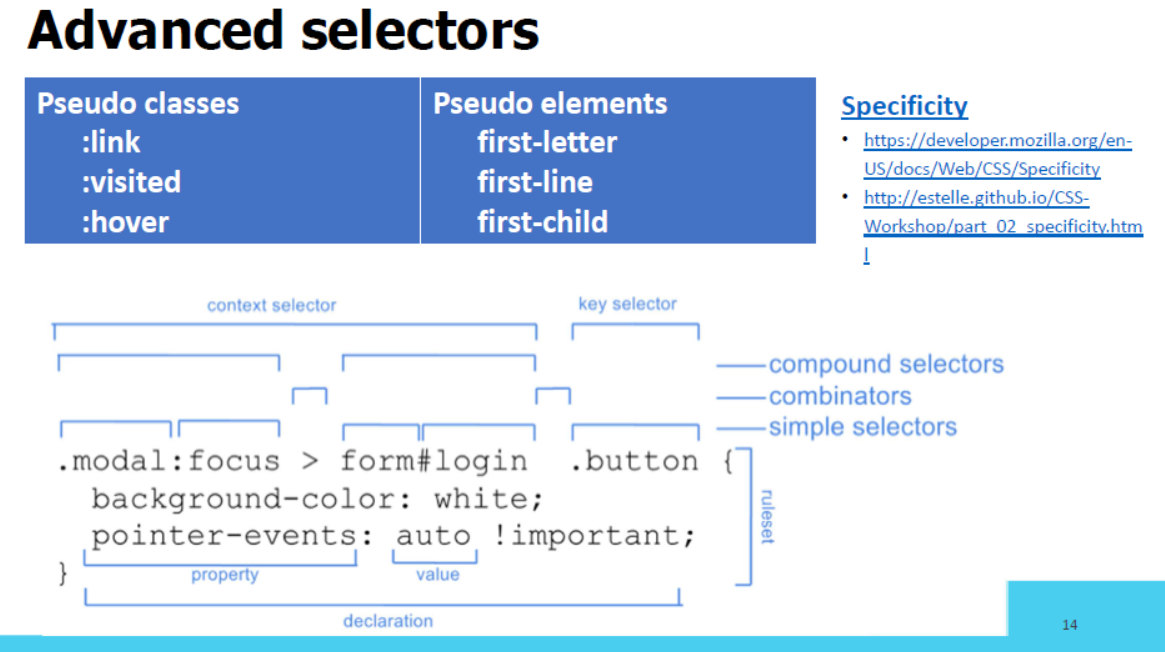
Advanced CSS selectors

Selectors are used for selecting the HTML elements in the attributes. Some different types of selectors are given below:

1.Adjacent Sibling Selector: It selects all the elements that are adjacent siblings of specified elements. It selects the second element if it immediately follows the first element.

2.Attribute Selector: It selects a particular type of inputs.

3.nth-of-type Selector: It selects an element from its position and types.

4.Direct Child Selector: It selects any element matching the second element that is a direct child of an element matching the first element. The element matched by the second selector must be the immediate children of the elements matched by the first selector.

5.General Sibling Selector: It selects only the first element if it follows the first element and both children are of the same parent element. It is not necessary that the second element immediately follows the first element.

Use for CSS media queries in responsive web development

By targeting the browser width, we can style content to look appropriate for a wide desktop browser, a medium-sized tablet browser, or a small phone browser. Adjusting the layout of a web page based on the width of the browser is called “responsive design.” Responsive design is made possible by CSS media queries.

In this how to, you’ll learn how to use media queries in responsive design.

  1. Start with an HTML page and a set of default CSS styles. These styles will be used by the browser no matter what width the browser is.
<pre class="wp-block-syntaxhighlighter-code brush: plain; notranslate">&lt;!DOCTYPE HTML&gt;
&lt;html&gt;
&lt;head&gt;
 &lt;meta charset="UTF-8"&gt;
 &lt;title&gt;Media Queries Example&lt;/title&gt;
 &lt;meta name="viewport" content="width=device-width, initial-scale=1.0"&gt;
 &lt;style&gt;
  body {
   background-color: #ccc;
  }
  #main {
   background-color: #fff;
   width: 80%;
   margin: 0 auto;
   padding: 2em;
  }
  article {
   float: right;
   width: 64.6666666%;
   padding: 1%;
   background-color: #ffaaaa;
  }
  aside {
   float: left;
   width: 31.3333333%;
   padding: 1%;
   background-color: #ffaaff;
  }
  footer {
   clear: both;
  }
 &lt;/style&gt;
&lt;/head&gt;
&lt;body&gt;
 <div id="main">
  <header>
   <h1>Media Queries</h1>
  </header>
  <article>
   <h2>Main Content</h2>
   <p>This is main content - it shows on right on desktops, on bottom on phones</p>
   <p>This is main content - it shows on right on desktops, on bottom on phones</p>
   <p>This is main content - it shows on right on desktops, on bottom on phones</p>
   <p>This is main content - it shows on right on desktops, on bottom on phones</p>
   <p>This is main content - it shows on right on desktops, on bottom on phones</p>
  </article>
  <aside>
   <h2>Sidebar Content</h2>
   <p>This is sidebar content - it shows on left on desktops, on bottom on phones</p>
   <p>This is sidebar content - it shows on left on desktops, on bottom on phones</p>
   <p>This is sidebar content - it shows on left on desktops, on bottom on phones</p>
  </aside>
  <footer>
   <p>This is the footer - it shows only on desktops</p>
  </footer>
 </div>
&lt;/body&gt;
&lt;/html&gt;
 </pre>

2. After the footer styles, write the following media query. This will apply the CSS within it whenever the browser width is less than or equal to 700px.

@media screen and (max-width: 700px) {

}

3. Between the curly braces of the media query, you can override the default styles to change the layout of the page for smaller browsers, like this:

@media screen and (max-width: 700px) {
 article {
  float: none;
  width: 98%;
  padding: 1%;
  background-color: #ffaaaa;
 }
 aside {
  float: none;
  width: 98%;
  padding: 1%;
  background-color: #ffaaff;
 }
 footer {
  display: none;
 }
}

4. Open the HTML page in a browser. This code renders the following, if your browser window is greater than 700px wide:

5. Drag the right edge of your web browser to make it narrower. When the width of the browser gets to 700px or less, the layout will change to the following:

Pros and cons of 3 ways of using CSS (INLINE,INTERNAL, EXTERNAL)

OPTION 1 – INTERNAL CSS

Internal CSS code is put in the <head> section of a particular page. The classes and IDs can be used to refer to the CSS code, but they are only active on that particular page. CSS styles embedded this way are downloaded each time the page loads so it may increase loading speed. However, there are some cases when using internal stylesheet is useful. One example would be sending someone a page template – as everything is in one page, it is a lot easier to see a preview. Internal CSS is put in between <style></style> tags. An example of internal stylesheet:

<head>
  <style type="text/css">
    p {color:white; font-size: 10px;}
    .center {display: block; margin: 0 auto;}
    #button-go, #button-back {border: solid 1px black;}
  </style>
</head>

Advantages of Internal CSS:

  • Only one page is affected by stylesheet.
  • Classes and IDs can be used by internal stylesheet.
  • There is no need to upload multiple files. HTML and CSS can be in the same file.

Disadvantages of Internal CSS:

  • Increased page loading time.
  • It affects only one page – not useful if you want to use the same CSS on multiple documents.

How to add Internal CSS to HTML page

Open your HTML page with any text editor. If the page is already uploaded to your hosting account, you can use a text editor provided by your hosting. If you have an HTML document on your computer, you can use any text editor to edit it and then re-upload the file to your hosting account using FTP client.

Locate <head> opening tag and add the following code just after it:

<style type="text/css">

Now jump to a new line and add CSS rules, for example:

body { background-color: blue; } h1 { color: red; padding: 60px; }

Once you are done adding CSS rules, add the closing style tag:

</style>

At the end, HTML document with internal stylesheet should look like this:

<!DOCTYPE html>
<html>
<head>
<style>
body {
    background-color: blue;
}
h1 {
    color: red;
    padding: 60px;
} 
</style>
</head>
<body>

<h1>Hostinger Tutorials</h1>
<p>This is our paragraph.</p>

</body>
</html>

OPTION 2 – EXTERNAL CSS

Probably the most convenient way to add CSS to your website, is to link it to an external .css file. That way any changes you made to an external CSS file will be reflected on your website globally. A reference to an external CSS file is put in the <head> section of the page:

<head>
  <link rel="stylesheet" type="text/css" href="style.css" />
</head>

while the style.css contains all the style rules. For example:

.xleftcol {
   float: left;
   width: 33%;
   background:#809900;
}
.xmiddlecol {
   float: left;
   width: 34%;
   background:#eff2df;
}

Advantages of External CSS:

  • Smaller size of HTML pages and cleaner structure.
  • Faster loading speed.
  • Same .css file can be used on multiple pages.

Disadvantages of External CSS:

  • Until external CSS is loaded, the page may not be rendered correctly.

OPTION 3 – INLINE CSS

Inline CSS is used for a specific HTML tag. <style> attribute is used to style a particular HTML tag. Using CSS this way is not recommended, as each HTML tag needs to be styled individually. Managing your website may become too hard if you only use inline CSS. However, it can be useful in some situations. For example, in cases when you don’t have an access to CSS files or need to apply style for a single element only. An example of HTML page with inline CSS would look like this:

<!DOCTYPE html>
<html>
<body style="background-color:black;">

<h1 style="color:white;padding:30px;">Hostinger Tutorials</h1>
<p style="color:white;">Something usefull here.</p>

</body>
</html>

Advantages of Inline CSS:

  • Useful if you want to test and preview changes.
  • Useful for quick-fixes.
  • Lower HTTP requests.

Disadvantages of Inline CSS:

  • Inline CSS must be applied to every element.

NEW FEATURES IN JS VERSION 6

There are three major categories of features:

30.2 New number and Math features 

30.2.1 New integer literals 

You can now specify integers in binary and octal notation:

> 0xFF // ES5: hexadecimal
255
> 0b11 // ES6: binary
3
> 0o10 // ES6: octal
8

30.2.2 New Number properties 

The global object Number gained a few new properties:

  • Number.EPSILON for comparing floating point numbers with a tolerance for rounding errors.
  • Number.isInteger(num) checks whether num is an integer (a number without a decimal fraction): > Number.isInteger(1.05) false > Number.isInteger(1) true > Number.isInteger(-3.1) false > Number.isInteger(-3) true
  • A method and constants for determining whether a JavaScript integer is safe(within the signed 53 bit range in which there is no loss of precision):
    • Number.isSafeInteger(number)
    • Number.MIN_SAFE_INTEGER
    • Number.MAX_SAFE_INTEGER
  • Number.isNaN(num) checks whether num is the value NaN. In contrast to the global function isNaN(), it doesn’t coerce its argument to a number and is therefore safer for non-numbers: > isNaN(‘???’) true > Number.isNaN(‘???’) false
  • Three additional methods of Number are mostly equivalent to the global functions with the same names: Number.isFiniteNumber.parseFloatNumber.parseInt.

30.2.3 New Math methods 

The global object Math has new methods for numerical, trigonometric and bitwise operations. Let’s look at four examples.Math.sign() returns the sign of a number:

> Math.sign(-8)
-1
> Math.sign(0)
0
> Math.sign(3)
1

Math.trunc() removes the decimal fraction of a number:

> Math.trunc(3.1)
3
> Math.trunc(3.9)
3
> Math.trunc(-3.1)
-3
> Math.trunc(-3.9)
-3

Math.log10() computes the logarithm to base 10:

> Math.log10(100)
2

Math.hypot() Computes the square root of the sum of the squares of its arguments (Pythagoras’ theorem):

> Math.hypot(3, 4)
5    

30.3 New string features 

New string methods:

> 'hello'.startsWith('hell')
true
> 'hello'.endsWith('ello')
true
> 'hello'.includes('ell')
true
> 'doo '.repeat(3)
'doo doo doo '

ES6 has a new kind of string literal, the template literal:

// String interpolation via template literals (in backticks)
const first = 'Jane';
const last = 'Doe';
console.log(`Hello ${first}${last}!`);
    // Hello Jane Doe!

// Template literals also let you create strings with multiple lines
const multiLine = `
This is
a string
with multiple
lines`;

30.4 Symbols 

Symbols are a new primitive type in ECMAScript 6. They are created via a factory function:

const mySymbol = Symbol('mySymbol');

Every time you call the factory function, a new and unique symbol is created. The optional parameter is a descriptive string that is shown when printing the symbol (it has no other purpose):

> mySymbol
Symbol(mySymbol)

30.4.1 Use case 1: unique property keys 

Symbols are mainly used as unique property keys – a symbol never clashes with any other property key (symbol or string). For example, you can make an object iterable (usable via the for-of loop and other language mechanisms), by using the symbol stored in Symbol.iterator as the key of a method (more information on iterables is given in the chapter on iteration):

const iterableObject = {
    [Symbol.iterator]() { // (A)
        ···
    }
}
for (const x of iterableObject) {
    console.log(x);
}
// Output:
// hello
// world

In line A, a symbol is used as the key of the method. This unique marker makes the object iterable and enables us to use the for-of loop.

30.4.2 Use case 2: constants representing concepts 

In ECMAScript 5, you may have used strings to represent concepts such as colors. In ES6, you can use symbols and be sure that they are always unique:

const COLOR_RED    = Symbol('Red');
const COLOR_ORANGE = Symbol('Orange');
const COLOR_YELLOW = Symbol('Yellow');
const COLOR_GREEN  = Symbol('Green');
const COLOR_BLUE   = Symbol('Blue');
const COLOR_VIOLET = Symbol('Violet');

function getComplement(color) {
    switch (color) {
        case COLOR_RED:
            return COLOR_GREEN;
        case COLOR_ORANGE:
            return COLOR_BLUE;
        case COLOR_YELLOW:
            return COLOR_VIOLET;
        case COLOR_GREEN:
            return COLOR_RED;
        case COLOR_BLUE:
            return COLOR_ORANGE;
        case COLOR_VIOLET:
            return COLOR_YELLOW;
        default:
            throw new Exception('Unknown color: '+color);
    }
}

Every time you call Symbol('Red'), a new symbol is created. Therefore, COLOR_RED can never be mistaken for another value. That would be different if it were the string 'Red'.

30.4.3 Pitfall: you can’t coerce symbols to strings 

Coercing (implicitly converting) symbols to strings throws exceptions:

const sym = Symbol('desc');

const str1 = '' + sym; // TypeError
const str2 = `${sym}`; // TypeError

The only solution is to convert explicitly:

const str2 = String(sym); // 'Symbol(desc)'
const str3 = sym.toString(); // 'Symbol(desc)'

Forbidding coercion prevents some errors, but also makes working with symbols more complicated.

The following operations are aware of symbols as property keys:

  • Reflect.ownKeys()
  • Property access via []
  • Object.assign()

The following operations ignore symbols as property keys:

  • Object.keys()
  • Object.getOwnPropertyNames()
  • for-in loop

30.5 Template literals 

ES6 has two new kinds of literals: template literals and tagged template literals. These two literals have similar names and look similar, but they are quite different. It is therefore important to distinguish:

  • Template literals (code): multi-line string literals that support interpolation
  • Tagged template literals (code): function calls
  • Web templates (data): HTML with blanks to be filled in

Template literals are string literals that can stretch across multiple lines and include interpolated expressions (inserted via ${···}):

const firstName = 'Jane';
console.log(`Hello ${firstName}!
How are you
today?`);

// Output:
// Hello Jane!
// How are you
// today?

Tagged template literals (short: tagged templates) are created by mentioning a function before a template literal:

> String.raw`A \tagged\ template`
'A \\tagged\\ template'

Tagged templates are function calls. In the previous example, the method String.rawis called to produce the result of the tagged template.

30.6 Variables and scoping 

ES6 provides two new ways of declaring variables: let and const, which mostly replace the ES5 way of declaring variables, var.

30.6.1 let 

let works similarly to var, but the variable it declares is block-scoped, it only exists within the current block. var is function-scoped.In the following code, you can see that the let-declared variable tmp only exists inside the block that starts in line A:

function order(x, y) {
    if (x > y) { // (A)
        let tmp = x;
        x = y;
        y = tmp;
    }
    console.log(tmp===x); // ReferenceError: tmp is not defined
    return [x, y];
}

30.6.2 const 

const works like let, but the variable you declare must be immediately initialized, with a value that can’t be changed afterwards.

const foo;
    // SyntaxError: missing = in const declaration

const bar = 123;
bar = 456;
    // TypeError: `bar` is read-only

Since for-of creates one binding (storage space for a variable) per loop iteration, it is OK to const-declare the loop variable:

for (const x of ['a', 'b']) {
    console.log(x);
}
// Output:
// a
// b

30.6.3 Ways of declaring variables 

The following table gives an overview of six ways in which variables can be declared in ES6 (inspired by a table by kangax):

HoistingScopeCreates global properties
varDeclarationFunctionYes
letTemporal dead zoneBlockNo
constTemporal dead zoneBlockNo
functionCompleteBlockYes
classNoBlockNo
importCompleteModule-globalNo

30.7 Destructuring 

Destructuring is a convenient way of extracting multiple values from data stored in (possibly nested) objects and Arrays. It can be used in locations that receive data (such as the left-hand side of an assignment). How to extract the values is specified via patterns (read on for examples).

30.7.1 Object destructuring 

Destructuring objects:

const obj = { first: 'Jane', last: 'Doe' };
const {first: f, last: l} = obj;
    // f = 'Jane'; l = 'Doe'

// {prop} is short for {prop: prop}
const {first, last} = obj;
    // first = 'Jane'; last = 'Doe'

Destructuring helps with processing return values:

const obj = { foo: 123 };

const {writable, configurable} =
    Object.getOwnPropertyDescriptor(obj, 'foo');

console.log(writable, configurable); // true true

30.7.2 Array destructuring 

Array destructuring (works for all iterable values):

const iterable = ['a', 'b'];
const [x, y] = iterable;
    // x = 'a'; y = 'b'

Destructuring helps with processing return values:

const [all, year, month, day] =
    /^(\d\d\d\d)-(\d\d)-(\d\d)$/
    .exec('2999-12-31');

30.7.3 Where can destructuring be used? 

Destructuring can be used in the following locations (I’m showing Array patterns to demonstrate; object patterns work just as well):

// Variable declarations:
const [x] = ['a'];
let [x] = ['a'];
var [x] = ['a'];

// Assignments:
[x] = ['a'];

// Parameter definitions:
function f([x]) { ··· }
f(['a']);

You can also destructure in a for-of loop:

const arr = ['a', 'b'];
for (const [index, element] of arr.entries()) {
    console.log(index, element);
}
// Output:
// 0 a
// 1 b

30.8 Parameter handling 

Parameter handling has been significantly upgraded in ECMAScript 6. It now supports parameter default values, rest parameters (varargs) and destructuring.Additionally, the spread operator helps with function/method/constructor calls and Array literals.

30.8.1 Default parameter values 

default parameter value is specified for a parameter via an equals sign (=). If a caller doesn’t provide a value for the parameter, the default value is used. In the following example, the default parameter value of y is 0:

function func(x, y=0) {
    return [x, y];
}
func(1, 2); // [1, 2]
func(1); // [1, 0]
func(); // [undefined, 0]

30.8.2 Rest parameters 

If you prefix a parameter name with the rest operator (...), that parameter receives all remaining parameters via an Array:

function format(pattern, ...params) {
    return {pattern, params};
}
format(1, 2, 3);
    // { pattern: 1, params: [ 2, 3 ] }
format();
    // { pattern: undefined, params: [] }

30.8.3 Named parameters via destructuring 

You can simulate named parameters if you destructure with an object pattern in the parameter list:

function selectEntries({ start=0, end=-1, step=1 } = {}) { // (A)
    // The object pattern is an abbreviation of:
    // { start: start=0, end: end=-1, step: step=1 }

    // Use the variables `start`, `end` and `step` here
    ···
}

selectEntries({ start: 10, end: 30, step: 2 });
selectEntries({ step: 3 });
selectEntries({});
selectEntries();

The = {} in line A enables you to call selectEntries() without paramters.

30.8.4 Spread operator (...

In function and constructor calls, the spread operator turns iterable values into arguments:

> Math.max(-1, 5, 11, 3)11
> Math.max(...[-1, 5, 11, 3])
11
> Math.max(-1, ...[-5, 11], 3)
11

In Array literals, the spread operator turns iterable values into Array elements:

> [1, ...[2,3], 4]
[1, 2, 3, 4]

30.9 Callable entities in ECMAScript 6 

In ES5, a single construct, the (traditional) function, played three roles:

  • Real (non-method) function
  • Method
  • Constructor

In ES6, there is more specialization. The three duties are now handled as follows. As far as function definitions and class definitions are concerned, a definition is either a declaration or an expression.

  • Real (non-method) function:
    • Arrow functions (only have an expression form)
    • Traditional functions (created via function definitions)
    • Generator functions (created via generator function definitions)
  • Method:
    • Methods (created by method definitions in object literals and class definitions)
    • Generator methods (created by generator method definitions in object literals and class definitions)
  • Constructor:
    • Classes (created via class definitions)

Especially for callbacks, arrow functions are handy, because they don’t shadow the this of the surrounding scope.For longer callbacks and stand-alone functions, traditional functions can be OK. Some APIs use this as an implicit parameter. In that case, you have no choice but to use traditional functions.Note that I distinguish:

  • The entities: e.g. traditional functions
  • The syntax that creates the entities: e.g. function definitions

Even though their behaviors differ (as explained later), all of these entities are functions. For example:

> typeof (() => {}) // arrow function
'function'
> typeof function* () {} // generator function
'function'
> typeof class {} // class
'function'

30.10 Arrow functions 

There are two benefits to arrow functions.First, they are less verbose than traditional function expressions:

const arr = [1, 2, 3];
const squares = arr.map(x => x * x);

// Traditional function expression:
const squares = arr.map(function (x) { return x * x });

Second, their this is picked up from surroundings (lexical). Therefore, you don’t need bind() or that = this, anymore.

function UiComponent() {
    const button = document.getElementById('myButton');
    button.addEventListener('click', () => {
        console.log('CLICK');
        this.handleClick(); // lexical `this`
    });
}

The following variables are all lexical inside arrow functions:

  • arguments
  • super
  • this
  • new.target

REFERENCES

http://www.plasmacomp.com/blogs/importance-of-css-in-web-development

https://developer.mozilla.org/en-US/docs/Web/CSS/CSS3

https://www.geeksforgeeks.org/advanced-selectors-in-css/

https://www.wikipedia.org/
Tutorial 7

Role of data in information systems

All information systems require the input of data in order to perform organizational activities. Data, as described by Stair and Reynolds (2006), is made up of raw facts such as employee information, wages, and hours worked, barcode numbers, tracking numbers or sale numbers. The scope of data collected depends on what information needs to be extrapolated for maximum efficiency. Kumar and Palvia (2001) state that: “ Data plays a vital role in organizations, and in recent years companies have recognized the significance of corporate data as an organizational asset. Raw data on it’s own however, has no representational value (Stair and Reynolds, 2006). Data is collected in order to create information and knowledge about particular subjects that interest any given organization in order for that organization to make better management decisions.

Data

Data are raw facts that can be processed and converted to meaningful information.

Data Types
Quantitative
Numerical
        Textual
        Boolean
        Data time


Qualitative
Visibility
          Modifiability
          Usability


Data persistence
Working data is contained in computer memory

Memory is volatile 

Data should be saved into non-volatile storage for persistence


Data persistence techniques
Data can be stored in

  • Files 
  • Databases

Data arrangement

  • Un-structured
  • Semi-structured
  • Structured

DATABASE

A database is an organized collection of data, generally stored and accessed electronically from a computer system. Where databases are more complex they are often developed using formal design and modeling techniques.

Database Server

A database server is a server which houses a database application that provides database services to other computer programs or to computers, as defined by the client–server model.

Database Management System

A database management system (DBMS) is system software for creating and managing databases. The DBMS provides users and programmers with a systematic way to create, retrieve, update and manage data.

Files vs Databases ( discussing pros and cons of them )

Files and DBs are external components

They are existing outside the software system

Software can connect to the files/DBs to perform CRUD operations on data 

Pros of the File System

  • Saving the files and downloading them in the file system is much simpler than it is in a database since a simple “Save As” function will help you out. Downloading can be done by addressing a URL with the location of the saved file.
  • Performance can be better than when you do it in a database. To justify this, if you store large files in DB, then it may slow down the performance because a simple query to retrieve the list of files or filename will also load the file data if you used Select * in your query. In a files ystem, accessing a file is quite simple and light weight.
  • Migrating the data is an easy process. You can just copy and paste the folder to your desired destination while ensuring that write permissions are provided to your destination.
  • It’s cost effective in most cases to expand your web server rather than pay for certain databases.
  • It’s easy to migrate it to cloud storage i.e. Amazon S3, CDNs, etc. in the future.

Cons of the File System

  • Loosely packed. There are no ACID (Atomicity, Consistency, Isolation, Durability) operations in relational mapping, which means there is no guarantee. Consider a scenario in which your files are deleted from the location manually or by some hacking dudes. You might not know whether the file exists or not. Painful, right?
  • Low security. Since your files can be saved in a folder where you should have provided write permissions, it is prone to safety issues and invites trouble, like hacking. It’s best to avoid saving in the file system if you cannot afford to compromise in terms of security.

Pros of Database

  • ACID consistency, which includes a rollback of an update that is complicated when files are stored outside the database.
  • Files will be in sync with the database and cannot be orphaned, which gives you the upper hand in tracking transactions.
  • Backups automatically include file binaries.
  • It’s more secure than saving in a file system.

Cons of Database

  • You may have to convert the files to blob in order to store them in the database.
  • Database backups will be more hefty and heavy.
  • Memory is ineffective. Often, RDBMSs are RAM-driven, so all data has to go to RAM first. Yeah, that’s right. Have you ever thought about what happens when an RDBMS has to find and sort data? RDBMS tracks each data page — even the lowest amount of data read and written — and it has to track if it’s in-memory or if it’s on-disk, if it’s indexed or if it’s sorted physically etc.

Different arrangements of data

Big Data includes huge valume, high velocity, and extensible variaty of data. These are 3 types: Structured data, Semi-structured data, and Unstructured data.

  1. Structured data –
    Structured data is a data whose elements are addressable for effective analysis. It has been organised into a formatted repository that is typically a database. It concern all data which can be stored in database SQL in table with rows and columns. They have relational key and can easily mapped into pre-designed fields. Today, those data are most processed in development and simplest way to manage information. Example: Relational data.
  2. semi-structured data –
    Semi-structured data is information that does not reside in a rational database but that have some organizational properties that make it easier to analyze. With some process, you can store them in the relation database (it could be very hard for some kind of semi-structured data), but Semi-structured exist to ease space. Example: XML data.
  3. Unstructured data –
    Unstructured data is a data that is which is not organised in a pre-defined manner or does not have a pre-defined data model, thus it is not a good fit for a mainstream relational database. So for Unstructured data, there are alternative platforms for storing and managing, it is increasingly prevalent in IT systems and is used by organizations in a variety of business intelligence and analytics applications. Example: Word, PDF, Text, Media logs.

Different types of databases

There are several types of database management systems. Here is a list of seven common database management systems:

  1. Hierarchical databases
  2. Network databases
  3. Relational databases
  4. Object-oriented databases
  5. Graph databases
  6. ER model databases
  7. Document databases

HIERARCHICAL DATABASES

In a hierarchical database management systems (hierarchical DBMSs) model, data is stored in a parent-children relationship nodes. In a hierarchical database, besides actual data, records also contain information about their groups of parent/child relationships. 

In a hierarchical database model, data is organized into a tree like structure. The data is stored in form of collection of fields where each field contains only one value. The records are linked to each other via links into a parent-children relationship. In a hierarchical database model, each child record has only one parent. A parent can have multiple children.

To retrieve a field’s data, we need to traversed through each tree until the record is found.

The hierarchical database system structure was developed by IBM in early 1960s. While hierarchical structure is simple, it is inflexible due to the parent-child one-to-many relationship. Hierarchical databases are widely used to build high performance and availability applications usually in banking and telecommunications industries.

The IBM Information Management System (IMS) and Windows Registry are two popular examples of hierarchical databases.

Types Of Database Management Systems

Advantage 

Hierarchical database can be accessed and updated rapidly because in this model structure is like as a tree and the relationships between records are defined in advance. This feature is a two-edged.

Disadvantage 

This type of database structure is that each child in the tree may have only one parent, and relationships or linkages between children are not permitted, even if they make sense from a logical standpoint. Hierarchical databases are so in their design. it can adding a new field or record requires that the entire database be redefined. 

NETWORK DATABASES

Network database management systems (Network DBMSs) use a network structure to create relationship between entities. Network databases are mainly used on a large digital computers. Network databases are hierarchical databases but unlike hierarchical databases where one node can have one parent only, a network node can have relationship with multiple entities. A network database looks more like a cobweb or interconnected network of records.

In network databases, children are called members and parents are called occupier. The difference between each child or member can have more than one parent.

Types Of Database Management Systems

The approval of the network data model is similar to a hierarchical data model. Data in a network database is organized in many-to-many relationships.The network database structure was invented by Charles Bachman. Some of the popular network databases are Integrated Data Store (IDS), IDMS (Integrated Database Management System), Raima Database Manager, TurboIMAGE, and Univac DMS-1100. 

RELATIONAL DATABASES

In relational database management systems (RDBMS), the relationship between data is relational and data is stored in tabular form of columns and rows. Each column if a table represents an attribute and each row in a table represents a record. Each field in a table represents a data value.

Structured Query Language (SQL) is a the language used to query a RDBMS including inserting, updating, deleting, and searching records.

 Relational databases work on each table has a key field that uniquely indicates each row, and that these key fields can be used to connect one table of data to another.

Types Of Database Management Systems

 Relational databases are the most popular and widely used databases. Some of the popular DDBMS are Oracle, SQL Server, MySQL, SQLite, and IBM DB2.

The relational database has two major reasons

  1. Relational databases can be used with little or no training.
  2. Database entries can be modified without specify the entire body.

Properties of Relational Tables

In the relational database we have to follow some properties which are given below.

  • It’s Values are Atomic
  • In Each Row is alone.
  • Column Values are of the Same thing.
  • Columns is undistinguished.
  • Sequence of Rows is Insignificant.
  • Each Column has a common Name.

RDBMs are the most popular databases. Learn here Most Popular Database In the World

OBJECT-ORIENTED MODEL

In this Model we have to discuss the functionality of the object oriented Programming. It takes more than storage of programming language objects. Object DBMS’s increase the semantics of the C++ and Java.I t provides full-featured database programming capability, while containing native language compatibility. It adds the database functionality to object programming languages. This approach is the analogical of the application and database development into a constant data model and language environment. Applications require less code, use more natural data modeling, and code bases are easier to maintain. Object developers can write complete database applications with a decent amount of additional effort.

The object-oriented database derivation is the integrity of object-oriented programming language systems and consistent systems. The power of the object-oriented databases comes from the cyclical treatment of both consistent data, as found in databases, and transient data, as found in executing programs.

Types Of Database Management Systems

Object-oriented databases use small, recyclable separated of software called objects. The objects themselves are stored in the object-oriented database. Each object contains of two elements:

  1. Piece of data (e.g., sound, video, text, or graphics).
  2. Instructions, or software programs called methods, for what to do with the data.

Object-oriented database management systems (OODBMs) were created in early 1980s. Some OODBMs were designed to work with OOP languages such as Delphi, Ruby, C++, Java, and Python. Some popular OODBMs are TORNADO, Gemstone, ObjectStore, GBase, VBase, InterSystems Cache, Versant Object Database, ODABA, ZODB, Poet. JADE, and Informix.

Disadvantage of Object-oriented databases

  1. Object-oriented databases have these disadvantages.
  2. Object-oriented database are more expensive to develop.
  3. In the Most organizations are unwilling to abandon and convert from those databases.

Benefits of Object-oriented databases

The benefits to object-oriented databases are compelling. The ability to mix and match reusable objects provides incredible multimedia capability.

GRAPH DATABASES

Graph Databases are NoSQL databases and use a graph structure for sematic queries. The data is stored in form of nodes, edges, and properties. In a graph database, a Node represent an entity or instance such as customer, person, or a car. A node is equivalent to a record in a relational database system. An Edge in a graph database represents a relationship that connects nodes. Properties are additional information added to the nodes.

The Neo4j, Azure Cosmos DB, SAP HANA, Sparksee, Oracle Spatial and Graph, OrientDB, ArrangoDB, and MarkLogic are some of the popular graph databases. Graph database structure is also supported by some RDBMs including Oracle and SQL Server 2017 and later versions. 

ER MODEL DATABASES 

An ER model is typically implemented as a database. In a simple relational database implementation, each row of a table represents one instance of an entity type, and each field in a table represents an attribute type. In a relational database a relationship between entities is implemented by storing the primary key of one entity as a pointer or “foreign key” in the table of another entity.
Entity-relationship model was developed by Peter Chen 1976. 

DOCUMENT DATABASES 

Document databases (Document DB) are also NoSQL database that store data in form of documents. Each document represents the data, its relationship between other data elements, and attributes of data. Document database store data in a key value form.
Document DB has become popular recently due to their document storage and NoSQL properties. NoSQL data storage provide faster mechanism to store and search documents.

Popular NoSQL databases are Hadoop/Hbase, Cassandra, Hypertable, MapR, Hortonworks, Cloudera, Amazon SimpleDB, Apache Flink, IBM Informix, Elastic, MongoDB, and Azure DocumentDB.

Data warehouse vs Big data

How the application components communicate with files and databases

Application components are logically coupled solely by the event relationships they share. An event type is dynamically created whenever a publisher publishes a new event type or a consumer subscribes to a new event type not already in the ENS database. This aspect is totally runtime-configured.

Difference between SQL STATEMENTS, PREPARED STATEMENTS, AND CALLABLE STATEMENTS

The Statement is used for executing a static SQL statement.

The PreparedStatement is used for executing a precompiled SQL statement.

The CallableStatement is an interface which is used to execute SQL stored procedures, cursors, and Functions.

Need for ORM & development with and without ORM

Object-relational-mapping is the idea of being able to write queries like the one above, as well as much more complicated ones, using the object-oriented paradigm of your preferred programming language.

Long story short, we are trying to interact with our database using our language of choice instead of SQL.Here’s where the Object-relational-mapper comes in. When most people say “ORM” they are referring to a library that implements this technique. For example, the above query would now look something like this:

var orm = require('generic-orm-libarry');
var user = orm("users").where({ email: 'test@test.com' });

As you can see, we are using an imaginary ORM library to execute the exact same query, except we can write it in JavaScript (or whatever language you’re using). We can use the same languages we know and love, and also abstract away some of the complexity of interfacing with a database.

As with any technique, there are tradeoffs that should be considered when using an ORM.

What are some popular ORMs?

Wikipedia has a great list of ORMs that exist for just about any language. That list is missing JavaScript, which is my language of choice, so I will throw my hat in the ring for Knex.js.

They’re not paying me to say that, I’ve simply enjoyed working with their software and I don’t have any experience with other JavaScript ORMs. This article might provide more insightful feedback for JavaScript specifically.

Similarities and differences between POJO, Java Beans, and JPA

POJO classes

POJO stands for Plain Old Java Object. It is an ordinary Java object, not bound by any special restriction other than those forced by the Java Language Specification and not requiring any class path. POJOs are used for increasing the readability and re-usability of a program. POJOs have gained most acceptance because they are easy to write and understand. They were introduced in EJB 3.0 by Sun microsystems.

A POJO should not:

  1. Extend prespecified classes, Ex: public class GFG extends javax.servlet.http.HttpServlet { … } is not a POJO class.
  2. Implement prespecified interfaces, Ex: public class Bar implements javax.ejb.EntityBean { … } is not a POJO class.
  3. Contain prespecified annotations, Ex: @javax.persistence.Entity public class Baz { … } is not a POJO class.

POJOs basically defines an entity. Like in you program, if you want a Employee class then you can create a POJO as follows:


// Employee POJO class to represent entity Employee
public class Employee
{
// default field
String name;
 // public field
public String id;
 
// private salary
private double salary;
 
//arg-constructor to initialize fields
public Employee(String name, String id, 
double salary)
{
this.name = name;
this.id = id;
this.salary = salary;
}
 
// getter method for name
public String getName()
{
return name;
}
 
// getter method for id
public String getId()
{
return id;
}
 
// getter method for salary
public Double getSalary()
{
return salary;
}
}
The above example is a well defined example of POJO class. As you can see, 

The above example is a well defined example of POJO class. As you can see, there is no restriction on access-modifier of fields. They can be private, default, protected or public. It is also not necessary to include any constructor in it.

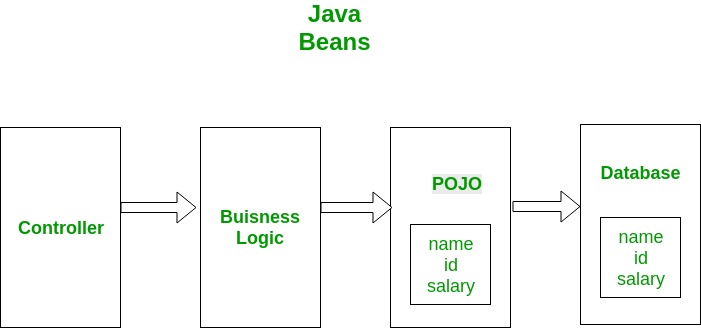
POJO is an object which encapsulates Business Logic. Following image shows a working example of POJO class. Controllers get interact with your business logic which in turn interact with POJO to access the database. In this example a database entity is represented by POJO. This POJO has the same members as database entity.

Java Beans

Beans are special type of Pojos. There are some restrictions on POJO to be a bean.

  1. All JavaBeans are POJOs but not all POJOs are JavaBeans.
  2. Serializable i.e. they should implement Serializable interface. Still some POJOs who don’t implement Serializable interface are called POJOs beacause Serializable is a marker interface and therefore not of much burden.
  3. Fields should be private. This is to provide the complete control on fields.
  4. Fields should have getters or setters or both.
  5. A no-arg constructor should be there in a bean.
  6. Fields are accessed only by constructor or getter setters.

Getters and Setters have some special names depending on field name. For example, if field name is someProperty then its getter preferably will be:

public void getSomeProperty()
{
   return someProperty;
} 

and setter will be

public void setSomePRoperty(someProperty)
{
   this.someProperty=someProperty;
}

Visibility of getters and setters in generally public. Getters and setters provide the complete restriction on fields. e.g. consider below property,

Integer age;

If you set visibility of age to public, then any object can use this. Suppose you want that age can’t be 0. In that case you can’t have control. Any object can set it 0. But by using setter method, you have control. You can have a condition in your setter method. Similarly, for getter method if you want that if your age is 0 then it should return null, you can achieve this by using getter method as in following example:


// Java program to illustrate JavaBeans
class Bean
{
// private field property
private Integer property;
Bean() {
// No-arg constructor
}
 
// setter method for property
public void setProperty(Integer property)
{
if (property == 0)
{
// if property is 0 return
return;
}
this.property=property;
}
 
// getter method for property
public int getProperty()
{
if (property == 0)
{
// if property is 0 return null
return null;
}
return property;
}
}
 
// Class to test above bean
public class GFG
{
public static void main(String[] args)
{
Bean bean = new Bean();
 
bean.setProperty(0);
System.out.println("After setting to 0: " +
bean.getProperty());
 
bean.setProperty(5);
System.out.println("After setting to valid" +
" value: " + bean.getProperty());
}
}


Output:-

After setting to 0:
null After setting to valid value: 5

JAVA PERSISTENCE API (JPA)

Java Persistence API is a Java Specification and Standard for Object Relational Mapping (ORM). In Object Relational Mapping we create Java Objects which represents the database entities. ORM also provides an EntityManager which provides methods to create, delete, update and find the objects from database. We don’t need to write low level queries, we just need to use entity manager and access the entities through java objects.

Initially, JPA was an internal part of Enterprise Java Beans specifications. Where the business entity beans used to be mapped with relational databases. In the EJB 3.0 the specifications regarding data access layer were moved out as an independent specification which was named as Java Persistence API.

ORM tools available for different development platforms (Java, PHP, and .Net)

JAVA[EDIT]

.NET[EDIT]

PHP[EDIT]

  • CakePHP, ORM and framework for PHP 5, open source (scalars, arrays, objects); based on database introspection, no class extending
  • CodeIgniter, framework that includes an ActiveRecord implementation
  • Doctrine, open source ORM for PHP 5.2.3, 5.3.X. Free software (MIT)
  • FuelPHP, ORM and framework for PHP 5.3, released under the MIT license. Based on the ActiveRecord pattern.
  • Laravel, framework that contains an ORM called “Eloquent” an ActiveRecord implementation.
  • Maghead, a database framework designed for PHP7 includes ORM, Sharding, DBAL, SQL Builder tools etc. free software, released under MIT license.
  • Propel, ORM and query-toolkit for PHP 5, inspired by Apache Torque, free software, MIT
  • Qcodo, ORM and framework for PHP 5, open source
  • QCubed, A community driven fork of Qcodo
  • Rocks, open source ORM for PHP 5.1 plus, free for non-commercial use, GPL
  • Redbean, ORM layer for PHP 5, creates and maintains tables on the fly, open source, BSD
  • Skipper, visualization tool and a code/schema generator for PHP ORM frameworks, commercial
  • Torpor, open source ORM for PHP 5.1 plus, free software, MIT, database and OS agnostic
  • Yii, ORM and framework for PHP 5, released under the BSD license. Based on the ActiveRecord pattern.
  • Zend Framework, framework that includes a table data gateway and row data gateway implementations.

Need for NoSQL indicating the benefits

Organizations are increasingly adopting NoSQL databases in response to the complexity and limitations of traditional, legacy relational databases. NoSQL databases are more scalable, can help you achieve better performance, and offers a more cost-effective way of developing, implementing and sharing software.

Key benefits of NoSQL include:

  • Efficient, scale-out architecture instead of monolithic architecture
  • The ability to handle high volumes of structured, semi-structured, and unstructured data
  • Being better aligned with object-oriented programming
  • Working well with today’s software development methodologies that involve agile sprints and frequent code pushes

Types of NoSQL databases-

There are 4 basic types of NoSQL databases:

  1. Key-Value Store – It has a Big Hash Table of keys & values {Example- Riak, Amazon S3 (Dynamo)}
  2. Document-based Store- It stores documents made up of tagged elements. {Example- CouchDB}
  3. Column-based Store- Each storage block contains data from only one column, {Example- HBase, Cassandra}
  4. Graph-based-A network database that uses edges and nodes to represent and store data. {Example- Neo4J}

Hadoop

Hadoop is an open source distributed processing framework that manages data processing and storage for big data applications running in clustered systems. It is at the center of a growing ecosystem of big data technologies that are primarily used to support advanced analytics initiatives, including predictive analytics, data mining and machine learning applications. Hadoop can handle various forms of structured and unstructured data, giving users more flexibility for collecting, processing and analyzing data than relational databases and data warehouses provide.

Hadoop core concepts

• Hadoop Distributed File System (HDFS™): A distributed file system that provides high-throughput access to application data

• Hadoop YARN: A framework for job scheduling and cluster resource management.

• Hadoop Map Reduce: A YARN-based system for parallel processing of large data sets

Concept of IR

Data in the storages should be fetched, converted into information, and produced for proper use.

Information is retrieved via search queries     

 • Keyword search       • Full-text search

The output can be     

 • Text       • Multimedia


The information retrieval process should be     

 • Fast/performance       •Scalable       •Efficient       •Reliable/Correct

Major implementations     

 • Elasticsearch (https://www.elastic.co/products/elasticsearch)       • Solr (http://lucene.apache.org/solr/)


Mainly used in search engines and recommendationsystems, with ranking       

• Additionally may use       • Natural language processing       • AI/Machine learning       • Ranking

REFERENCES

https://www.wikipedia.org/

https://www.quora.com/

https://www.techopedia.com/

Tutorial 06

SERVER-SIDE DEVELOPMENT 2 REST

Message oriented communication and Resource oriented communication

Message oriented communication

Message oriented communication is a way of communicating between processes. Messages, which correspond to events, are the basic units of data delivered.In synchronous communication, the sender blocks waiting for the receiver to engage in the exchange.

Resource oriented communication

RoCL, the Resource oriented Communication Library we present in this paper, usesexisting low-level communication libraries to interface networking hardware. As a newintermediate-level communication library it offers a novel approach to system programmers to facilitate the development of a higher-level programming environment that supports the resource oriented computation paradigm of CoR.

Resource based nature of the REST style

The fundamental concept in any RESTful API is the resource. A resource is an object with a type, associated data, relationships to other resources, and a set of methods that operate on it. It is similar to an object instance in an object-oriented programming language, with the important difference that only a few standard methods are defined for the resource (corresponding to the standard HTTP GET, POST, PUT and DELETE methods), while an object instance typically has many methods.

Resources can be grouped into collections. Each collection is homogeneous so that it contains only one type of resource, and unordered. Resources can also exist outside any collection. In this case, we refer to these resources as singleton resources. Collections are themselves resources as well.

Collections can exist globally, at the top level of an API, but can also be contained inside a single resource. In the latter case, we refer to these collections as sub-collections. Sub-collections are usually used to express some kind of “contained in” relationship. We go into more detail on this in Relationships.

The diagram below illustrates the key concepts in a RESTful API…

We call information that describes available resources types, their behavior, and their relationships the resource model of an API. The resource model can be viewed as the RESTful mapping of the application data model.

Meaning of “representations” in REST style

In REST-speak, a client and server exchange representations of a resource, which reflect its current state or its desired state. REST, or Representational state transfer, is a way for two machines to transfer the state of a resource via representations.

Constraints of REST, (indicating their use in the domain of web)

  • Client-server 

The REST is for explicitly for networked distributed systems, which are based on the client-server style

  • Layered System 

A client doesn’t need to know whether it is connected directly to the end server, or to an intermediary along the way. •Intermediary servers may improve system scalability by enabling load-balancing and by providing shared caches. •Layers may also enforce security policies.

  •  Stateless 

One client can send multiple requests to the server •each request is independent •every request must contain all the necessary information so that the server can understand it and process it accordingly. •the server must not hold any information about the client state. •Any state information must stay on client –such as sessions.

  • Cacheable 

As many clients access the same server, often they may request the same resources •it is necessary that these responses might be cached, avoiding unnecessary processing, which may affect performance

  • Code-On-Demand (Optional) 

This allows the customer to run some code on demand, that is, extend part of server logic to the client, either through an applet or scripts.

  • Uniform Interface 

As the constraint name itself applies, you MUST decide APIs interface for resources inside the system which are exposed to API consumers and follow religiously. A resource in the system should have only one logical URI and that should provide a way to fetch related or additional data. It’s always better to synonymise a resource with a web page.Any single resource should not be too large and contain each and everything in its representation. Whenever relevant, a resource should contain links (HATEOAS) pointing to relative URIs to fetch related information.

Also, the resource representations across system should follow certain guidelines such as naming conventions, link formats or data format (xml or/and json).

All resources should be accessible through a common approach such as HTTP GET and similarly modified using a consistent approach.

Once a developer becomes familiar with one of your API, he should be able to follow the similar approach for other APIs.

Examples of different types of implementations for the elements of REST style

Connectors

Connectors represent the activities involved in accessing resources and transferring representations. Roles provide an interface for components to implement. REST encapsulates different activities of accessing and transferring representations into different connector types. The table below summarizes the connector types:

Connector TypeDescriptionExample
ClientSending requests, receiving responses.HTTP library
ServerListening for requests, sending responses.Web Server API
CacheCan be located at the client or server connector to save cacheable responses, can also be shared between several clientsBrowser cache
ResolverTransforms resource identifiers into network addresses.bind (DNS lookup library)
TunnelRelays requests, any component can switch from active behavior to a tunnel behavior.SOCKS, SSL after HTTP CONNECT

Data Elements

The key aspect of REST is the state of the data elements, its components communicate by transferring representations of the current or desired state of data elements. REST identifies six data elements: a resource, resource identifier, resource metadata, representation, representation metadata, and control data, shown in the table below:

Data ElementDescriptionExample
ResourceAny information that can be named is a resource. A resource is a conceptual mapping to a set of entities not the entity itself. Such a mapping can change over time. In general, a RESTful resource is anything that is addressable over the Web.Title of a movie from IMDb, A Flash movie from YouTube, Images from Flickr etc
Resource IdentifierEvery resource must have a name that uniquely identifies it. Under HTTP these are called URIs. Uniform Resource Identifier (URI) in a RESTful system is a hyperlink to a resource. It is the only means for clients and servers to exchange representations of resources.The relationship between URIs and resources is many to one. A resource can have multiple URIs which provide different information about the location of a resource.Standardized format of URI:scheme://host:port/path?queryString#fragmente.g:http://some.domain.com/orderinfo?id=123
Resource metadataThis describes the resource. A metadata provides additional information such as location information, alternate resource identifiers for different formats or entity tag information about the resource itself.Source link, vary
RepresentationIt is something that is sent back and forth between clients and servers. So, we never send or receive resources, only their representations. A representation captures the current or intended state of a resource. A particular resource may have multiple representationsSequence of bytes, HTML document, archive document, image document
Representation metadataThis describes the representation.Headers (media-type)
Control dataThis defines the purpose of a message between components, such as the action being requested.If-Modified-Since, If-Match

Components

In REST, the various software that interacts with one another are called components. They are categorized by roles summarized in the table below:

Component RoleDescriptionExample
Origin ServerUses a server connector to receive the request, and is the definitive source for representations of its resources. Each server provides a generic interface to its services as a resource hierarchy.Apache httpd, Microsoft IIS
User AgentUses a client connector to initiate a request and becomes the ultimate recipient of the response.Browser like Netscape Navigator etc
GatewayAct as both, client and server in order to forward – with possible translation – requests and responses.Squid, CGI, Reverse Proxy

Proxy

CERN Proxy, Netscape Proxy, Gauntlet

How to define the API of RESTful web services using RESTful URLs

REST is used to build Web services that are lightweight, maintainable, and scalable in nature. A service which is built on the REST architecture is called a RESTful service. The underlying protocol for REST is HTTP, which is the basic web protocol. REST stands for REpresentational State Transfer

RESTful API — also referred to as a RESTful web service — is based on representational state transfer (REST) technology, an architectural style and approach to communications often used in web services development.

RESTFUL KEY ELEMENTS

Web services have really come a long way since its inception. In 2002, the Web consortium had released the definition of WSDL and SOAP web services. This formed the standard of how web services are implemented.

In 2004, the web consortium also released the definition of an additional standard called RESTful. Over the past couple of years, this standard has become quite popular. And is being used by many of the popular websites around the world which include Facebook and Twitter.

REST is a way to access resources which lie in a particular environment. For example, you could have a server that could be hosting important documents or pictures or videos. All of these are an example of resources. If a client, say a web browser needs any of these resources, it has to send a request to the server to access these resources. Now REST defines a way on how these resources can be accessed.

The key elements of a RESTful implementation are as follows:

  1. Resources – The first key element is the resource itself. Let assume that a web application on a server has records of several employees. Let’s assume the URL of the web application is http://demo.guru99.com. Now in order to access an employee record resource via REST, one can issue the command http://demo.guru99.com/employee/1 – This command tells the web server to please provide the details of the employee whose employee number is 1.
  2. Request Verbs – These describe what you want to do with the resource. A browser issues a GET verb to instruct the endpoint it wants to get data. However, there are many other verbs available including things like POST, PUT, and DELETE. So in the case of the example http://demo.guru99.com/employee/1 , the web browser is actually issuing a GET Verb because it wants to get the details of the employee record.
  3. Request Headers – These are additional instructions sent with the request. These might define the type of response required or the authorization details.
  4. Request Body – Data is sent with the request. Data is normally sent in the request when a POST request is made to the REST web service. In a POST call, the client actually tells the web service that it wants to add a resource to the server. Hence, the request body would have the details of the resource which is required to be added to the server.
  5. Response Body – This is the main body of the response. So in our example, if we were to query the web server via the request http://demo.guru99.com/employee/1 , the web server might return an XML document with all the details of the employee in the Response Body.
  6. Response Status codes – These codes are the general codes which are returned along with the response from the web server. An example is the code 200 which is normally returned if there is no error when returning a response to the client.

RESTFUL METHODS

The below diagram shows mostly all the verbs (POST, GET, PUT, and DELETE) and an example of what they would mean.

Let’s assume that we have a RESTful web service is defined at the location. http://demo.guru99.com/employee . When the client makes any request to this web service, it can specify any of the normal HTTP verbs of GET, POST, DELETE and PUT. Below is what would happen If the respective verbs were sent by the client.

  1. POST – This would be used to create a new employee using the RESTful web service
  2. GET – This would be used to get a list of all employee using the RESTful web service
  3. PUT – This would be used to update all employee using the RESTful web service
  4. DELETE – This would be used to delete all employee using the RESTful web service

RESTFUL ARCHITECTURE

An application or architecture considered RESTful or REST-style has the following characteristics

  1. State and functionality are divided into distributed resources – This means that every resource should be accessible via the normal HTTP commands of GET, POST, PUT, or DELETE. So if someone wanted to get a file from a server, they should be able to issue the GET request and get the file. If they want to put a file on the server, they should be able to either issue the POST or PUT request. And finally, if they wanted to delete a file from the server, they an issue the DELETE request.
  2. The architecture is client/server, stateless, layered, and supports caching –
  • Client-server is the typical architecture where the server can be the web server hosting the application, and the client can be as simple as the web browser.
  • Stateless means that the state of the application is not maintained in REST.For example, if you delete a resource from a server using the DELETE command, you cannot expect that delete information to be passed to the next request.In order to ensure that the resource is deleted, you would need to issue the GET request. The GET request would be used to first get all the resources on the server. After which one would need to see if the resource was actually deleted.

(REF-HTTPS://WWW.GURU99.COM/RESTFUL-WEB-SERVICES.HTML)

Pros and cons of using MVC for RESTful web service development

Here are some of the features that Web API provides:

  • Strong Support for URL Routing to produce clean URLs using familiar MVC style routing semantics
  • Content Negotiation based on Accept headers for request and response serialization
  • Support for a host of supported output formats including JSON, XML, ATOM
  • Strong default support for REST semantics but they are optional
  • Easily extensible Formatter support to add new input/output types
  • Deep support for more advanced HTTP features via HttpResponseMessage and HttpRequestMessage
    classes and strongly typed Enums to describe many HTTP operations
  • Convention based design that drives you into doing the right thing for HTTP Services
  • Very extensible, based on MVC like extensibility model of Formatters and Filters
  • Self-hostable in non-Web applications 
  • Testable using testing concepts similar to MVC

Some Issues about Web API

Web API is similar to MVC but not the Same

Although Web API looks a lot like MVC it’s not the same and some common functionality of MVC behaves differently in Web API. For example, the way single POST variables are handled is different than MVC and doesn’t lend itself particularly well to some AJAX scenarios with POST data.

Code Duplication

If you build an MVC application that also exposes a Web API it’s quite likely that you end up duplicating a bunch of code and – potentially – infrastructure. You may have to create authentication logic both for an HTML application and for the Web API which might need something different altogether. More often than not though the same logic is used, and there’s no easy way to share. If you implement an MVC ActionFilter and you want that same functionality in your Web API you’ll end up creating the filter twice.

JAX-RS API and its implementations

There are two implementations

  • Jersey
  • RESTeasy

 Annotations in JAX-RS, explaining their use.

  • @Path – The @Pathannotation’s value is a relative URI path indicating where the Java class will be hosted: for example,/helloworld. You can also embed variables in the URIs to make a URI path template. For example, you could ask for the name of a user and pass it to the application as a variable in the URI:/helloworld/{username}. 
  • @GET – The @GETannotation is a request method designator and corresponds to the similarly named HTTP method. The Java method annotated with this request method designator will process HTTP GET requests. The behavior of a resource is determined by the HTTP method to which the resource is responding.
  • @POST – The @POSTannotation is a request method designator and corresponds to the similarly named HTTP method. The Java method annotated with this request method designator will process HTTP POST requests. The behavior of a resource is determined by the HTTP method to which the resource is responding.
  • @PUT – The @PUTannotation is a request method designator and corresponds to the similarly named HTTP method. The Java method annotated with this request method designator will process HTTP PUT requests. The behavior of a resource is determined by the HTTP method to which the resource is responding. 
  • @DELETE – The @DELETEannotation is a request method designator and corresponds to the similarly named HTTP method. The Java method annotated with this request method designator will process HTTP DELETE requests. The behavior of a resource is determined by the HTTP method to which the resource is responding.

Use and importance of “media type” in JAX-RS

Introduction to @Consumes and @Produces

All resource methods can consume and produce content of almost any type. If you make a POST request to a URI, such as api/books, the REST API expects the HTTP body to contain a payload that represents the resource it should create.

This resource can be represented using any media type. Although typically, it will be represented in either, JSON or XML, but it could be plain text, binary or a custom format. It doesn’t matter, as long as there is a method in the resource class that can consume that media type.

Resource Method Selection

So, the question is: how does the resource class know the payload’s media type and how does it select the right method to deal with it? Well, in the header of the HTTP request, there is a content-type field that specifies the media type and on the other end, the server end, the resource class has a method annotated with the matching type.

So, for example: If a request has the content-type set to application/json the resource method that consumes this request is the method annotated with the same type, and likewise if the content type were application/xml the method annotated with MediaType APPLICATION_XML would handle that request.

CONSUME AND PRODUCE JSON

Just as a method can consume a payload of a given type, it can produce a response payload of a specific media type too. In the case of a POST request, the created resource can be returned back to the client. Conventionally, it is returned back in the same format as it was received. So returns back as JSON, if it was POSTed in JSON format, nevertheless, this does not have to be the case.

There is another HTTP header that specifies the accepted return media-type and there is a matching annotation on the resource method also. Such a method would be annotated with the @Produces annotation and passed the MediaType APPLICATION_JSON.

So a full example would be an HTTP POST request with a content-type of JSON and an accept type of JSON, and the corresponding resource method would be annotated appropriately with both a @Consumes and @Produces annotation with the MediaType APPLICATION_JSON.

Tutorial 05

Compare and contrast web applications with web services

Below is the difference between web service and web application

Web Applications:
 

Applications that are accessed through browsers are web applications and it is the collection of multiple web pages. These are basically dependent on client server architecture where browser acts as a client which sends the request to server. Afterwards, web pages are rendered as per responses from the server. Purpose of web services is communications between various programs and applications.
 During building any web application, order of focus is on:

  • UI portion[Front end implementation]
  • Functional portion[Back end implementation]

Web services:

Web services are mainly used to communicate the information between two systems ignoring UI interaction. Messages are transferred from one application to another application via JSONS and XMLs etc.
 Web services are mainly dependent on back end implementation, UI doesn’t have any space. Clients can access only exposed methods of any functionality. Majority of the qa testing services are focusing on automating the web services to speed up the testing for integrated applications.
 Web services are constructed basically to hide the implementation of any product and APIs are exposed to perform specific functions. Web services leads to many advantages for various software testing companies mentioned below:

  • Re-usability of any code
  • Reduced the Complexity
  • Enhanced the features of any product
  • Impact on cost
  • Speed

Web Application :-
User-to-program interaction ,
Static integration of components ,
Monolithic service ,
Ad hoc or proprietary protocol

Web Services :-
Program-to-program interaction ,
Dynamic integration of components ,
Service aggregation (micro-services) ,
Interoperability (RPC/SOAP/REST)

What is WSDL …

WSDL (Web Services Description Language) is an XML format for describing network services as a set of endpoints operating on messages containing either document-oriented or procedure-oriented information. The operations and messages are described abstractly, and then bound to a concrete network protocol and message format to define an endpoint.

WSDL Usage :- WSDL is an XML-based interface description language that is used for describing the functionality offered by a web service. The acronym is also used for any specific WSDL description of a web service (also referred to as a WSDL file), which provides a machine-readable description of how the service can be called, what parameters it expects, and what data structures it returns. Therefore, its purpose is roughly similar to that of a type signature in a programming language.

Fundamental properties of a WSDL document

Specifies three fundamental properties:

  • What a service does -operations (methods) provided by the service
  • How a service is accessed -data format and protocol details
  • Where a service is located -Address (URL) details 

The document written in WSDL is also simple called a WSDL (or WSDL document).

WSDL is a contract between the XML(SOAP) Web service and the client who wishes to use this service.

The service provides the WSDL document and the Web service client uses the WSDL document to create the stub (or to dynamically decode messages.

WSDL document structure

The diagram below illustrates the elements that are present in a WSDL document, and indicates their relationships.

Elements in WSDL

A WSDL document has a definitions element that contains the other five elements,They are types, message, portType, binding and service. The following sections describe the features of the generated client code.

types:-

Provides information about any complex data types used in the WSDL document. When simple types are used the document does not need to have a types section.

message:-

An abstract definition of the data being communicated. In the example, the message contains just one part, response, which is of type string, where string is defined by the XML Schema.

portType:-

An abstract set of operations supported by one or more endpoints.

binding:-

Describes how the operation is invoked by specifying concrete protocol and data format specifications for the operations and messages.

service:-

Specifies the port address(es) of the binding. The service is a collection of network endpoints or ports.

The PortType and operation elements in WSDL with the java equivalences

PortType element may have one or more operation elements, each of which defines an RPC- or documentstyle Web service method

• Java equivalence:

portType -> java interface

operation -> method name

Compare and contrast the binding and service elements in WSDL

Binding…

Map a PortTypeto a specific protocol, typically SOAPover http, using a specific data encoding style .

One portTypecan be bound to several different protocolsby using more than one port .

Bindings refer back to portTypesby name, just as operations point to messages .

Binding styles may be either “RPC” or “Document”(SOAP) .

Also specify SOAP encoding .

Services…

It binds the Web service to a specific network-addressable location, i.e. it takes the bindings declared previously and ties them to a port, which is a physical network endpoint to which clients bind over the specified protocol, contain one or more port elements, each of which represents a different Web service and the port element assigns the URL to a specific binding

Reference a particular binding, and along with addressing information is wrapped together into a service element to form the final physical, network addressable Web service

Access point for each port

  • port type -The operations performed by the web service. 
  • message -The messages used by the web service. 
  • types -The data types used by the web service. 
  • binding -The communication protocols used by the web service

How SOAP is used with HTTP

All the browsers supports HTTP for compatibility and its the most widely used Internet Protocol.A SOAP method is an HTTP request/HTTP response that compiles with the SOAP encoding rules. using SOAP, a protocol submitted to the W3C data can be enclosed in XML and transmitted using any number of Internet Protocols.

How SOAP can be used for functional oriented communication

All communication by SOAP is done via the HTTP protocol. Prior to SOAP, a lot of web services used the standard RPC (Remote Procedure Call) style for communication. This was the simplest type of communication, but it had a lot of limitations.

Let’s consider the below diagram to see how this communication works. In this example, let’s assume the server hosts a web service which provided 2 methods as

  • GetEmployee – This would get all Employee details
  • SetEmployee – This would set the value of the details like employees dept, salary, etc. accordingly.

In the normal RPC style communication, the client would just call the methods in its request and send the required parameters to the server, and the server would then send the desired response.

The above communication model has the below serious limitations

  1. Not Language Independent – The server hosting the methods would be in a particular programming language and normally the calls to the server would be in that programming language only.
  2. Not the standard protocol – When a call is made to the remote procedure, the call is not carried out via the standard protocol. This was an issue since mostly all communication over the web had to be done via the HTTP protocol.
  3. Firewalls – Since RPC calls do not go via the normal protocol, separate ports need to be open on the server to allow the client to communicate with the server. Normally all firewalls would block this sort of traffic, and a lot of configuration was generally required to ensure that this sort of communication between the client and the server would work.

To overcome all of the limitations cited above, SOAP would then use the below communication model

  • The client would format the information regarding the procedure call and any arguments into a SOAP message and sends it to the server as part of an HTTP request. This process of encapsulating the data into a SOAP message was known as Marshalling.
  • The server would then unwrap the message sent by the client, see what the client requested for and then send the appropriate response back to the client as a SOAP message. The practice of unwrapping a request sent by the client is known as Demarshalling.

Structure of SOAP message in message oriented communication

Envelope

wraps entire message and contains header and body

defines an overall framework for expressing what is in a message; who should deal with it, and whether it is optional or mandatory

Header

optional element with additional info such as security or routing

Body

application-specific message content being communicated as arbitrary XML payloads in the request and response messages

fault element provides information about errors that occurred while processing the message

The importance of the SOAP attachments

SOAP messages may have one or more attachments

Each AttachmentPartobject has a MIME header to indicate the type of data it contains.

It may also have additional MIME headers to identify it or to give its location, which can be useful when there are multiple attachments

When a SOAP message has one or more AttachmentPartobjects, its SOAPPartobject may or may not contain message content

Annotations in JAX-WS, providing examples of their us

  • JAX-WS (Java API for XML Web Services) is a java package/library for developing web services 
  • It supports both Functional oriented and message oriented communication via SOAP
  • JAX-WS API hides the complexity of SOAP from the application develope
  • JAX-WS uses the javax.jwspackage 
  • It uses annotations
    @WebService @WebMethod @OneWay @WebParam @WebResult

Web service can be tested using different approaches

Testing of web services is one of the important type of software testing approach, which is mainly used to determine the expectations for reliability, functionality, performance, etc.

As these days Automated testing is considered as one of the most trending methodology in the field of software testing, hence testing web apps based on RESTful APIs through automation will provide effective test results. Some of the best & popular tools for web services testing are:

  1. SoapUI,
  2. TestingWhiz,
  3. SOATest
  4. TestMaker,
  5. Postman, etc.

DISTRIBUTED SYSTEMS

Distributed systems & Distributed computing

A distributed system is a network that consists of autonomous computers that are connected using a distribution middleware. They help in sharing different resources and capabilities to provide users with a single and integrated coherent network.


Distributed computing also refers to the use of distributed systems to solve computational problems. In distributed computing, a problem is divided into many tasks, each of which is solved by one or more computers, which communicate with each other via message passing.

Standalone systems vs Distributed systems

standalone systems

distributed systems

All the components are executed within a single device

The components are distributed and executed in multiple devices

Do not need a network

need a network

Usually one or tightly coupled set of technologies are used to develop (JAVA, .NET)

Multiple and loosely coupled set of technologies are used to develop (HTML +CSS + JS + PHP)

Example for standalone systems: A fax machine is a stand-alone device because it does not require a computer, printer, modem, or other device. A printer, on the other hand, is not a stand-alone device because it requires a computer to feed it data.

Example for distributed systems:
Intranets, Internet, WWW, email.
Telecommunication networks: Telephone networks and Cellular networks.
Network of branch office computers -Information system to handle automatic processing of orders,
Real-time process control: Aircraft control systems,
Electronic banking,
Airline reservation systems,
Sensor networks,
Mobile and Pervasive Computing systems.

Elements of distributed systems

The elements of a distribution system include distribution mains, arterial mains, storage reservoirs, and system accessories (including booster stations, valves, hydrants, main-line meters, service connections, and backflow preventers).

  • Distribution mains are the pipelines that make up the distribution system. Their function is to carry water from the water source or treatment works to users.
  • Arterial mains are large-size distribution mains. They are interconnected with smaller distribution mains to form a complete gridiron system.
  • Storage reservoirs are structured to store water. They may serve to equalize the supply or pressure in the distribution system.
  • System accessories include the following:
  • Booster stations that pump water from storage or a relatively low-pressure main to the distribution system, or it may serve a portion of the system that is at a higher elevation.
  • Valves that serve to control the flow of water in the distribution system by isolating areas for repair or by regulating system flow or pressure.
  • Hydrants that are designed to allow water from the distribution system to be used for fire-fighting purposes.
  • Main-line meters that serve to record the flow of water in a part of the distribution system.
  • Service connections that connect either an individual building or other plumbing system to the distribution-system mains.
  • Backflow preventers that protect the water source from contamination.

Different types of services, which can be gained from distributed systems

There are various types of services, which can be gained from distributed systems

Mail service - SMTP, POP3, IMAP  
File transferring and sharing - FTP  
Remote logging - telnet  
Games and multimedia - RTP, SIP, H.26x  
Web – HTTP 

Types of Web-based Systems

  • Web sites
  • Web applications
  • Web services and client apps
  • Rich Internet Applications (RIAs)/Rich Webbased Applications (RiWAs)

Importance of maintaining the quality of the code…

Robustness- refers to how tough the data is and how well it can deal with various inputs and if it can detect and mitigate errors well. This is very important as you as a programmer don’t want data that easily fails apart and you also want one that can make your job easier and detect and handle data in a data-set.

Readability- refers to how well you can read the text and how well the layout has been made.It’s very important when your programming code is readable, this is because when you or someone else is reviewing the code it is best if it’s comprehensible so any errors that may appear can seen noticed easier, and also, if the code is cluttered then looking through it for errors or if you want to make changes will take much longer.

Portability- refers to how well the data can be used in various OS computers and environments.This aspect is very important as you may be working on something that has to be used by another company that may or may not be in another country, so you have to make sure that another OS, computer and company can understand and use your code.

Maintainability- refers to how easy it is to maintain the code. This is also highly important as you will encounter issues throughout programming since it’s part of the process of making good code, but once you’re done bugs and errors will pop up that you may or may not have seen before, having easily maintainable data means that you can just go in and quickly find out the issue and resolve it, this also refers to how easy it is to edit the code and process too.

Code Quality Metrics

Qualitative Code Quality Metrics

Qualitative metrics are subjective measurements that aim to better define what good means.

Extensibility

Extensibility is the degree to which software is coded to incorporate future growth. The central theme of extensible applications is that developers should be able to add new features to code or change existing functionality without it affecting the entire system.

Maintainability

Code maintainability is a qualitative measurement of how easy it is to make changes, and the risks associated with such changes.

Developers can make judgments about maintainability when they make changes — if the change should take an hour but it ends up taking three days, the code probably isn’t that maintainable.

Another way to gauge maintainability is to check the number of lines of code in a given software feature or in an entire application. Software with more lines can be harder to maintain.

Readability and Code Formatting

Readable code should use indentation and be formatted according to standards particular to the language it’s written in; this makes the application structure consistent and visible.

Comments should be used where required, with concise explanations given for each method. Names for methods should be meaningful in the sense that the names indicate what the method does.

Well-tested

Well tested programs are likely to be of higher quality, because much more attention is paid to the inner workings of the code and its impact on users. Testing means that the application is constantly under scrutiny.

Quantitative Code Quality Metrics

There are a few quantitative measurements to reveal well written applications:

Weighted Micro Function Points

This metric is a modern software sizing algorithm that parses source code and breaks it down into micro functions. The algorithm then produces several complexity metrics from these micro functions, before interpolating the results into a single score.

WMFP automatically measures the complexity of existing source code. The metrics used to determine the WMFP value include comments, code structure, arithmetic calculations, and flow control path.

Halstead Complexity Measures

The Halstead complexity measures were introduced in 1977. These measures include program vocabulary, program length, volume, difficulty, effort, and the estimated number of bugs in a module. The aim of the measurement is to assess the computational complexity of a program. The more complex any code is, the harder it is to maintain and the lower its quality.

Cyclomatic Complexity

Cyclomatic complexity is a metric that measures the structural complexity of a program. It does so by counting the number of linearly independent paths through a program’s source code. Methods with high cyclomatic complexity (greater than 10) are more likely to contain defects.

With cyclomatic complexity, developers get an indicator of how difficult it will be to test, maintain, and troubleshoot their programming. This metric can be combined with a size metric such as lines of code, to predict how easy the application will be to modify and maintain.

Code Quality Metrics: The Business Impact

From a business perspective, the most important aspects of code quality are those that most significantly impact on software ROI. Software maintenance consumes 40 to 80 percent of the average software development budget. A major challenge in software maintenance is understanding the existing code, and this is where code quality metrics can have a big impact.

Consequently, quality code should always be:

  • Easy to understand (readability, formatting, clarity, well-documented)
  • Easy to change (maintainability, extensibility)

Tools to maintain the code quality

SonarQube

A more sophisticated analysis tool than the ones used in the first two steps, SonarQube digs deeper into the code and examines several metrics of code complexity. This allows the developers to understand your software better.

Coverage.py

This tool measures code coverage, showing the parts of the source code tested for errors. Ideally, 100% of the code is checked, but 80-90% is a healthy percentage.

Linters

Used for static analysis of the source code, linters serve as primary indicators of potential issues with the code. PyLint is a popular choice for Python, while ESLint is used for JavaScript.

Collabolator

According to many rankings it is clearly a leader among all the tools. Collaborator is the most comprehensive peer code review tool, built for teams working on projects where code quality is critical.

Codebrag

It is an free and open-source tool. It is famous for its simplicity . Codebrag is used to solve issues like non-blocking code review, inline comments & likes, smart email notifications etc. What’s more it helps in delivering enhanced software using its agile code review.

Gerrit

Gerrit is a web based code review system, facilitating online code reviews for projects using the Git version control system. Gerrit makes reviews easier by showing changes in a side-by-side display, and allowing inline comments to be added by any reviewer.

Dependency Managers

First what is a dependency? A Dependency is an external standalone program module (library) that can be as small as a single file or as large as a collection of files and folders organized into packages that performs a specific task. For example, backup-mongodb is a dependency for a blog application that uses it for remotely backing up its database and sending it to an email address. In other words, the blog application is dependent on the package for doing backups of its database.

Dependency managers are software modules that coordinate the integration of external libraries or packages into larger application stack. Dependency managers use configuration files like composer.json, package.json, build.gradle or pom.xml to determine:

  1. What dependency to get
  2. What version of the dependency in particular and
  3. Which repository to get them from.

A repository is a source where the declared dependencies can be fetched from using the the name and version of that dependency. Most dependency managers have dedicated repositories where they fetch the declared dependencies from. For example, maven central for maven and gradle, npmfor npm, and packagist for composer.

So when you declare a dependency in your config file — e.g. composer.json, the manager will goto the repository to fetch the dependency that match the exact criteria you have set in the config file and make it available in your execution environment for use.

Example of Dependency Managers

  1. Composer (used with php projects)
  2. Gradle (used with Java projects including android apps. and also is a build tool)
  3. Node Package Manager (NPM: used with Nodejs projects)
  4. Yarn
  5. Maven (used with Java projects including android apps. and also is a build tool)

Why do I need Dependency Managers

Summing them up in two points:

  • They make sure the same version of dependencies you used in dev environment is what is being used in production. No unexpected behaviours
  • They make keeping your dependencies updated with latest patch, release or major version very easy.

Role of dependency/package management tools in software development

Dependency management tools move the responsibility of managing third-party libraries from the code repository to the automated build. Typically dependency management tools use a single file to declare all library dependencies, making it much easier to see all libraries and their versions at once.

Different dependency/package management tools used in industry

Functions in dependency/package management tools in software development. A software package is an archive file containing a computer program as well as necessary metadata for its deployment. The computer program can be in source code that has to be compiled and built first.Package metadata include package description, package version, and dependencies (other packages that need to be installed beforehand). Package managers are charged with the task of finding, installing, maintaining or uninstalling software packages upon the user’s command. Typical functions of a package management system include:

• Working with file archivers to extract package archives

• Ensuring the integrity and authenticity of the package by verifying their digital certificates and checksums

• Looking up, downloading, installing or updating existing software from a software repository or app store

• Grouping packages by function to reduce user confusion

• Managing dependencies to ensure a package is installed with all packages it requires, thus avoiding “dependency hell”

Dependency management tools move the responsibility of managing third-party libraries from the code repository to the automated build. Typically dependency management tools use a single file to declare all library dependencies, making it much easier to see all libraries and their versions at once.

Build tool…

Build tools are programs that automate the creation of executable applications from source code(eg. .apk for android app). Building incorporates compiling,linking and packaging the code into a usable or executable form.

Basically build automation is the act of scripting or automating a wide variety of tasks that software developers do in their day-to-day activities like:

  1. Downloading dependencies.
  2. Compiling source code into binary code.
  3. Packaging that binary code.
  4. Running tests.
  5. Deployment to production systems.

Why do we use build tools or build automation?

In small projects, developers will often manually invoke the build process. This is not practical for larger projects, where it is very hard to keep track of what needs to be built, in what sequence and what dependencies there are in the building process. Using an automation tool allows the build process to be more consistent.

The role of build automation in build tools indicating the need for build automation

Build Automation is the process of scripting and automating the retrieval of software code from a repository, compiling it into a binary artifact, executing automated functional tests, and publishing it into a shared and centralized repository.

Compare and contrast different build tools used in industry

Ant with Ivy

Ant was the first among “modern” build tools. In many aspects it is similar to Make. It was released in 2000 and in a short period of time became the most popular build tool for Java projects. It has very low learning curve thus allowing anyone to start using it without any special preparation. It is based on procedural programming idea.

After its initial release, it was improved with the ability to accept plug-ins.

Major drawback was XML as the format to write build scripts. XML, being hierarchical in nature, is not a good fit for procedural programming approach Ant uses. Another problem with Ant is that its XML tends to become unmanageably big when used with all but very small projects.

Later on, as dependency management over the network became a must, Ant adopted Apache Ivy.

Main benefit of Ant is its control of the build process.

Maven

Maven was released in 2004. Its goal was to improve upon some of the problems developers were facing when using Ant.

Maven continues using XML as the format to write build specification. However, structure is diametrically different. While Ant requires developers to write all the commands that lead to the successful execution of some task, Maven relies on conventions and provides the available targets (goals) that can be invoked. As the additional, and probably most important addition, Maven introduced the ability to download dependencies over the network (later on adopted by Ant through Ivy). That in itself revolutionized the way we deliver software.

However, Maven has its own problems. Dependencies management does not handle conflicts well between different versions of the same library (something Ivy is much better at). XML as the build configuration format is strictly structured and highly standardized. Customization of targets (goals) is hard. Since Maven is focused mostly on dependency management, complex, customized build scripts are actually harder to write in Maven than in Ant.

Maven configuration written in XML continuous being big and cumbersome. On bigger projects it can have hundreds of lines of code without actually doing anything “extraordinary”.

Main benefit from Maven is its life-cycle. As long as the project is based on certain standards,with Maven one can pass through the whole life cycle with relative ease. This comes at a cost of flexibility.

In the mean time the interest for DSLs (Domain Specific Languages) continued increasing. The idea is to have languages designed to solve problems belonging to a specific domain. In case of builds, one of the results of applying DSL is Gradle.

 Gradle

Gradle combines good parts of both tools and builds on top of them with DSL and other improvements. It has Ant’s power and flexibility with Maven’s life-cycle and ease of use. The end result is a tool that was released in 2012 and gained a lot of attention in a short period of time. For example, Google adopted Gradle as the default build tool for the Android OS.

Gradle does not use XML. Instead, it had its own DSL based on Groovy (one of JVM languages). As a result, Gradle build scripts tend to be much shorter and clearer than those written for Ant or Maven. The amount of boilerplate code is much smaller with Gradle since its DSL is designed to solve a specific problem: move software through its life cycle, from compilation through static analysis and testing until packaging and deployment.

Initially, Gradle used Apache Ivy for its dependency management. Later own it moved to its own native dependency resolution engine.

Gradle effort can be summed as “convention is good and so is flexibility”.

Build life cycle

Maven is based around the central concept of a build lifecycle. What this means is that the process for building and distributing a particular artifact (project) is clearly defined.

For the person building a project, this means that it is only necessary to learn a small set of commands to build any Maven project, and the POM will ensure they get the results they desired.

There are three built-in build lifecycles: default, clean and site. The default lifecycle handles your project deployment, the clean lifecycle handles project cleaning, while the site lifecycle handles the creation of your project’s site documentation.

A Build Lifecycle is Made Up of Phases

Each of these build lifecycles is defined by a different list of build phases, wherein a build phase represents a stage in the lifecycle.

For example, the default lifecycle comprises of the following phases

  • validate – validate the project is correct and all necessary information is available
  • compile – compile the source code of the project
  • test – test the compiled source code using a suitable unit testing framework. These tests should not require the code be packaged or deployed
  • package – take the compiled code and package it in its distributable format, such as a JAR.
  • verify – run any checks on results of integration tests to ensure quality criteria are met
  • install – install the package into the local repository, for use as a dependency in other projects locally
  • deploy – done in the build environment, copies the final package to the remote repository for sharing with other developers and projects.

These lifecycle phases (plus the other lifecycle phases not shown here) are executed sequentially to complete the default lifecycle. Given the lifecycle phases above, this means that when the default lifecycle is used, Maven will first validate the project, then will try to compile the sources, run those against the tests, package the binaries (e.g. jar), run integration tests against that package, verify the integration tests, install the verified package to the local repository, then deploy the installed package to a remote repository.

What is Maven…

Maven, a Yiddish word meaning accumulator of knowledge, was originally started as an attempt to simplify the build processes in the Jakarta Turbine project. There were several projects each with their own Ant build files that were all slightly different and JARs were checked into CVS. We wanted a standard way to build the projects, a clear definition of what the project consisted of, an easy way to publish project information and a way to share JARs across several projects.

The result is a tool that can now be used for building and managing any Java-based project. We hope that we have created something that will make the day-to-day work of Java developers easier and generally help with the comprehension of any Java-based project.

How Maven uses conventions over configurations …

Maven uses Convention over Configuration, which means developers are not required to create build process themselves.When a Maven project is created,Maven creates default project structure. Developer is only required to place files accordingly and he/she need not to define any configuration in pom.xml.

Build phases, build life cycle, build profile, and build goal in Maven

A Build Lifecycle is a well-defined sequence of phases, which define the order in which the goals are to be executed. Here phase represents a stage in life cycle. As an example, a typical Maven Build Lifecycle consists of the following sequence of phases.

PhaseHandlesDescription
prepare-resourcesresource copyingResource copying can be customized in this phase.
validateValidating the informationValidates if the project is correct and if all necessary information is available.
compilecompilationSource code compilation is done in this phase.
TestTestingTests the compiled source code suitable for testing framework.
packagepackagingThis phase creates the JAR/WAR package as mentioned in the packaging in POM.xml.
installinstallationThis phase installs the package in local/remote maven repository.
DeployDeployingCopies the final package to the remote repository.

Maven Build Lifecycle 

The Maven build follows a specific life cycle to deploy and distribute the target project.

There are three built-in life cycles:

  • default: the main life cycle as it’s responsible for project deployment
  • clean: to clean the project and remove all files generated by the previous build
  • site: to create the project’s site documentation

Maven Goal 

Each phase is a sequence of goals, and each goal is responsible for a specific task.

When we run a phase – all goals bound to this phase are executed in order.

Here are some of the phases and default goals bound to them:

  • compiler:compile – the compile goal from the compiler plugin is bound to the compile phase
  • compiler:testCompile is bound to the test-compile phase
  • surefire:test is bound to test phase
  • install:install is bound to install phase
  • jar:jar and war:war is bound to package phase

We can list all goals bound to a specific phase and their plugins using the command:

1mvn help:describe -Dcmd=PHASENAME

For example, to list all goals bound to the compile phase, we can run:

1mvn help:describe -Dcmd=compile

And get the sample output:

12compile' is a phase corresponding to this plugin:org.apache.maven.plugins:maven-compiler-plugin:3.1:compile

How Maven manages dependency/packages and build life cycle

Best Practice – Using a Repository Manager

A repository manager is a dedicated server application designed to manage repositories of binary components. The usage of a repository manager is considered an essential best practice for any significant usage of Maven.

Purpose

A repository manager serves these essential purposes:

  • act as dedicated proxy server for public Maven repositories
  • provide repositories as a deployment destination for your Maven project outputs

Use the POM

A Project Object Model or POM is the fundamental unit of work in Maven. It is an XML file that contains information about the project and configuration details used by Maven to build the project. It contains default values for most projects.

Contemporary tools and practices widely used in the software industry

1. Bower

The package management system Bower runs on NPM which seems a little redundant but there is a difference between the two, notably that NPM offers more features while Boweraims for a reduction in filesize and load times for frontend dependencies.

2. NPM

Each project can use a package.json file setup through NPM and even managed with Gulp(on Node). Dependencies can be updated and optimized right from the terminal. And you can build new projects with dependency files and version numbers automatically pulled from the package.json file.NPM is valuable for more than just dependency management, and it’s practically a must-know tool for modern web development. If you’re confused please check out this Reddit thread for a beginner’s explanation.

3. RubyGems

RubyGems is a package manager for Ruby with a high popularity among web developers. The project is open source and inclusive of all free Ruby gems.To give a brief overview for beginners, a “gem” is just some code that runs on a Ruby environment. This can lead to programs like Bundler which manage gem versions and keep everything updated.

4. RequireJS

There’s something special about RequireJS in that it’s primarily a JS toolset. It can be used for loading JS modules quickly including Node modules.RequireJS can automatically detect required dependencies based on what you’re using so this might be akin to classic software programming in C/C++ where libraries are included with further libraries.

5. Jam

Browser-based package management comes in a new form with JamJS. This is a JavaScript package manager with automatic management similar to RequireJS.All your dependencies are pulled into a single JS file which lets you add and removeitems quickly. Plus these can be updated in the browser regardless of other tools you’re using (like RequireJS).

6. Browserify

Most developers know of Browserify even if it’s not part of their typical workflow. This is another dependency management tool which optimizes required modules and libraries by bundling them together.These bundles are supported in the browser which means you can include and merge modules with plain JavaScript. All you need is NPM to get started and then Browserify to get moving.

7. Mantri

Still in its early stages of growth, MantriJS is a dependency system for mid-to-high level web applications. Dependencies are managed through namespaces and organized functionally to avoid collisions and reduce clutter.

8. Volo

The project management tool volo is an open source NPM repo that can create projects, add libraries, and automate workflows.Volo runs inside Node and relies on JavaScript for project management. A brief intro guide can be found on GitHub explaining the installation process and common usage. For example if you run the command volo create you can affix any library like HTML5 Boilerplate.

9. Ender

Ender is the “no-library library” and is one of the lightest package managers you’ll find online. It allows devs to search through JS packages and install/compile them right from the command line. Ender is thought of as “NPM’s little sister” by the dev team.

10. pip

The recommended method for installing Python dependencies is through pip. This tool was created by the Python Packaging Authority and it’s completely open source just like Python itself

Tutorial 02 – Industry Practices and Tools 1

What is the need for VCS?

Version control is a system that records changes to a file or set of files over time so that you can recall specific versions later. For the examples in this book, you will use software source code as the files being version controlled, though in reality you can do this with nearly any type of file on a computer.

Differentiate the three models of VCSs, stating their pros and cons

  1. Local version control systems

Some benefits of Local version control systems:

  • Everything is in your Computer

Disadvantages of Local version control systems:

  • Cannot be used for collaborative software development

2. Centralized Version Control Systems

Centralized Version Control Systems were developed to record changes in a central system and enable developers to collaborate on other systems. Centralized Version Control Systems have a lot to offer, however they also have some serious disadvantages.

Some benefits of Centralized Version Control Systems:

  • Relatively easy to set up
  • Provides transparency
  • Enable admins control the workflow

Disadvantages of Centralized Version Control Systems:

  • If the main server goes down, developers can’t save versioned changes
  • Remote commits are slow
  • Unsolicited changes might ruin development
  • If the central database is corrupted, the entire history could be lost (security issues)

3.Distributed Version Control Systems

Distributed Version Control Systems (DVCSs) don’t rely on a central server. They allow developers to clone the repository and work on that version. Develops will have the entire history of the project on their own hard drives.

It is often said that when working with Distributed Version Control Systems, you can’t have a single central repository. This is not true! Distributed Version Control Systems don’t prevent you from having a single “central” repository. They just provide you with more options.

Advantages of DVCS over CVCS:

  • Because of local commits, the full history is always available
  • No need to access a remote server (faster access)
  • Ability to push your changes continuously
  • Saves time, especially with SSH keys
  • Good for projects with off-shore developers

Downsides of Distributed Version Control Systems:

  • It may not always be obvious who did the most recent change
  • File locking doesn’t allow different developers to work on the same piece of code simultaneously. It helps to avoid merge conflicts, but slows down development
  • DVCS enables you to clone the repository – this could mean a security issue
  • Managing non-mergeable files is contrary to the DVCS concept
  • Working with a lot of binary files requires a huge amount of space, and developers can’t do diffs

Git and GitHub, are they same or different? Discuss with facts.

Git is a revision control system, a tool to manage your source code history. GitHub is a hosting service for Git repositories. So they are not the same thing: Git is the tool, GitHub is the service for projects that use Git.

Git is indeed a VCS (Version Control System – just like SVN and Mercurial). You can use GitHub to host Git projects (as well as some others, like BitBucket or GitLab you mentioned). You can, in addition to Git (which is a command-line based software), also use a GUI frontend for Git (like GitKraken you mentioned).

Personally, I find the GitHub GUI (in the browser) in combination with the Git command line utility more than enough to manage everything, but I can imagine that you would like to have things a bit more clearly layed-out in a GUI. I’ve tested out GitKraken and it is good software. Saying it is just a ‘tiny commercial project not worth looking at, and only looking for money’ is pretty short-sighted, I think. It is excellent software, but you’ll have to pay for it. If you don’t have the money or don’t want to spend the money, GitHub Desktop is a very good alternative.

Compare and contrast the Git commands, commit and push

Basically git commit “records changes to the repository” while git push “updates remote refs along with associated objects”. So the first one is used in connection with your local repository, while the latter one is used to interact with a remote repository.

Here is a nice picture from Oliver Steele, that explains the git model and the commands:

Discuss the use of staging area and Git directory

The Git directory is where Git stores the metadata and object database for your project. This is the most important part of Git, and it is what is copied when you clone a repository from another computer.

The staging area is a simple file, generally contained in your Git directory, that stores information about what will go into your next commit. It’s sometimes referred to as the index, but it’s becoming standard to refer to it as the staging area.

The basic Git workflow goes something like this:

  1. You modify files in your working directory.
  2. You stage the files, adding snapshots of them to your staging area.
  3. You do a commit, which takes the files as they are in the staging area and stores that snapshot permanently to your Git directory.

Explain the collaboration workflow of Git, with example

A Git Workflow is a recipe or recommendation for how to use Git to accomplish work in a consistent and productive manner. Git workflows encourage users to leverage Git effectively and consistently. Git offers a lot of flexibility in how users manage changes. Given Git’s focus on flexibility, there is no standardized process on how to interact with Git. When working with a team on a Git managed project, it’s important to make sure the team is all in agreement on how the flow of changes will be applied. To ensure the team is on the same page, an agreed upon Git workflow should be developed or selected. There are several publicized Git workflows that may be a good fit for your team. Here, we’ll be discussing some of these workflow options.

The array of possible workflows can make it hard to know where to begin when implementing Git in the workplace. This page provides a starting point by surveying the most common Git workflows for software teams.

As you read through, remember that these workflows are designed to be guidelines rather than concrete rules. We want to show you what’s possible, so you can mix and match aspects from different workflows to suit your individual needs.

Discuss the benefits of CDNs

  • Media and Advertising: In media, CDNs enhance the performance of streaming content to a large degree by delivering latest content to end users quickly. We can easily see today, there is a growing demand for online video, and real time audio/video and other media streaming applications. This demand is leveraged by media, advertising and digital content service providers by delivering high quality content efficiently for users. CDNs accelerate streaming media content such as breaking news, movies, music, online games and multimedia games in different formats. The content is made available from the datacenter which is nearest to users’ location.
  • Business Websites: CDNs accelerate the interaction between users and websites, this acceleration is highly essential for corporate businesses. In websites speed is one important metric and a ranking factor. If a user is far away from a website the web pages will load slowly. Content delivery networks overcome this problem by sending requested content to the user from the nearest server in CDN to give the best possible load times, thus speeding the delivery process.
  • Education: In the area of online education CDNs offer many advantages. Many educational institutes offer online courses that require streaming video/audio lectures, presentations, images and distribution systems. In online courses students from around the world can participate in the same course. CDN ensures that when a student logs into a course, the content is served from the nearest datacenter to the student’s location. CDNs support educational institutes by steering content to regions where most of the students reside.
  • E-Commerce: E-commerce companies make use of CDNs to improve their site performance and making their products available online. According to Computer World, CDN provides 100% uptime of e-commerce sites and this leads to improved global website performance. With continuous uptime companies are able to retain existing customers, leverage new customers with their products and explore new markets, to maximize their business outcomes.

How CDNs differ from web hosting servers?

  1. Web Hosting is used to host your website on a server and let users access it over the internet. A content delivery network is about speeding up the access/delivery of your website’s assets to those users.
  2. Traditional web hosting would deliver 100% of your content to the user. If they are located across the world, the user still must wait for the data to be retrieved from where your web server is located. A CDN takes a majority of your static and dynamic content and serves it from across the globe, decreasing download times. Most times, the closer the CDN server is to the web visitor, the faster assets will load for them.
  3. Web Hosting normally refers to one server. A content delivery network refers to a global network of edge servers which distributes your content from a multi-host environment.

Identify free and commercial CDNs

A Content Delivery Network (CDN) is a globally distributed network of web servers whose purpose is to provide faster delivery, and highly available content. The content is replicated throughout the CDN so it exists in many places all at once. A client accesses a copy of the data near to the client, as opposed to all clients accessing the same central server, in order to avoid bottlenecks near that server.

Discuss the requirements for virtualization

Hardware and software requirements for virtualization also can vary based on the operating system and other software you need to run. You generally must have a fast enough processor, enough RAM and a big enough hard drive to install the system and application software you want to run, just as you would if you were installing it directly on your physical machine.

You’ll generally need slightly more resources to comfortably run software within a virtual machine, because the virtual machine software itself will consume some of your resources. If you’re not sure whether your computer can comfortably run a given workload under a virtualization scenario, you may want to check with the makers of the virtualization software and the operating system and apps you must run.

Discuss and compare the pros and cons of different virtualization techniques in different levels

The advantages of switching to a virtual environment are plentiful, saving you money and time while providing much greater business continuity and ability to recover from disaster.

  • Reduced spending: For companies with fewer than 1,000 employees, up to 40 percent of an IT budget is spent on hardware. Purchasing multiple servers is often a good chunk of this cost. Virtualizing requires fewer servers and extends the lifespan of existing hardware. This also means reduced energy costs.
  • Easier backup and disaster recovery: Disasters are swift and unexpected. In seconds, leaks, floods, power outages, cyber-attacks, theft and even snow storms can wipe out data essential to your business. Virtualization makes recovery much swifter and accurate, with less manpower and a fraction of the equipment – it’s all virtual.
  • Better business continuity: With an increasingly mobile workforce, having good business continuity is essential. Without it, files become inaccessible, work goes undone, processes are slowed and employees are less productive. Virtualization gives employees access to software, files and communications anywhere they are and can enable multiple people to access the same information for more continuity.

DISADVANTAGES OF VIRTUALIZATION

The disadvantages of virtualization are mostly those that would come with any technology transition. With careful planning and expert implementation, all of these drawbacks can be overcome.

  • Upfront costs: The investment in the virtualization software, and possibly additional hardware might be required to make the virtualization possible. This depends on your existing network. Many businesses have sufficient capacity to accommodate the virtualization without requiring a lot of cash. This obstacle can also be more readily navigated by working with a Managed IT Services provider, who can offset this cost with monthly leasing or purchase plans.
  • Software licensing considerations: This is becoming less of a problem as more software vendors adapt to the increased adoption of virtualization, but it is important to check with your vendors to clearly understand how they view software use in a virtualized environment to a
  • Possible learning curve: Implementing and managing a virtualized environment will require IT staff with expertise in virtualization. On the user side a typical virtual environment will operate similarly to the non-virtual environment. There are some applications that do not adapt well to the virtualized environment – this is something that your IT staff will need to be aware of and address prior to converting.

popular implementations and available tools for each level of visualization

Here’s my run-down of some of the best, most popular or most innovative data visualization tools available today. These are all paid-for (although they all offer free trials or personal-use licences). Look out for another post soon on completely free and open source alternatives.

Tableau

Tableau is often regarded as the grand master of data visualization software and for good reason. Tableau has a very large customer base of 57,000+ accounts across many industries due to its simplicity of use and ability to produce interactive visualizations far beyond those provided by general BI solutions. It is particularly well suited to handling the huge and very fast-changing datasets which are used in Big Data operations, including artificial intelligence and machine learning applications, thanks to integration with a large number of advanced database solutions including Hadoop, Amazon AWS, My SQL, SAP and Teradata. Extensive research and testing has gone into enabling Tableau to create graphics and visualizations as efficiently as possible, and to make them easy for humans to understand.

Qlikview

Qlik with their Qlikview tool is the other major player in this space and Tableau’s biggest competitor. The vendor has over 40,000 customer accounts across over 100 countries, and those that use it frequently cite its highly customizable setup and wide feature range as a key advantage. This however can mean that it takes more time to get to grips with and use it to its full potential. In addition to its data visualization capabilities Qlikview offers powerful business intelligence, analytics and enterprise reporting capabilities and I particularly like the clean and clutter-free user interface. Qlikview is commonly used alongside its sister package, Qliksense, which handles data exploration and discovery. There is also a strong community and there are plenty of third-party resources available online to help new users understand how to integrate it in their projects.

FusionCharts

This is a very widely-used, JavaScript-based charting and visualization package that has established itself as one of the leaders in the paid-for market. It can produce 90 different chart types and integrates with a large number of platforms and frameworks giving a great deal of flexibility. One feature that has helped make FusionCharts very popular is that rather than having to start each new visualization from scratch, users can pick from a range of “live” example templates, simply plugging in their own data sources as needed.

Highcharts

Like FusionCharts this also requires a licence for commercial use, although it can be used freely as a trial, non-commercial or for personal use. Its website claims that it is used by 72 of the world’s 100 largest companies and it is often chosen when a fast and flexible solution must be rolled out, with a minimum need for specialist data visualization training before it can be put to work. A key to its success has been its focus on cross-browser support, meaning anyone can view and run its interactive visualizations, which is not always true with newer platforms.

What is the hypervisor and what is the role of it?

A hypervisor or virtual machine monitor is computer software, firmware or hardware that creates and runs virtual machines. A computer on which a hypervisor runs one or more virtual machines is called a host machine, and each virtual machine is called a guest machine.

Understanding the Role of a Hypervisor

The explanation of a hypervisor up to this point has been fairly simple: it is a layer of software that sits between the hardware and the one or more virtual machines that it supports. Its job is also fairly simple. The three characteristics defined by Popek and Goldberg illustrate these tasks:

  • Provide an environment identical to the physical environment
  • Provide that environment with minimal performance cost
  • Retain complete control of the system resources

How does the emulation is different from VMs?

Virtual machines make use of CPU self-virtualization, to whatever extent it exists, to provide a virtualized interface to the real hardware. Emulators emulate hardware without relying on the CPU being able to run code directly and redirect some operations to a hypervisor controlling the virtual container.

Compare and contrast the VMs and containers/dockers, indicating their advantages and disadvantages

Both VMs and containers can help get the most out of available computer hardware and software resources. Containers are the new kids on the block, but VMs have been, and continue to be, tremendously popular in data centers of all sizes.

If you’re looking for the best solution for running your own services in the cloud, you need to understand these virtualization technologies, how they compare to each other, and what are the best uses for each. Here’s our quick introduction.

Benefits of VMs

  • All OS resources available to apps
  • Established management tools
  • Established security tools
  • Better known security controls

Difference between framework, library, and plugin…

A plugin extends the capabilities of a larger application. That sounds exactly like what your address book is doing.

A library is a collection of subroutines or classes used to develop software. I think any component that instantiates its own database falls outside the scope of a library.

Framework is a collection of libraries which provide unique properties and behavior to your application.

The key difference between a library and a framework is “Inversion of Control”. When you call a method from a library, you are in control. But with a framework, the control is inverted: the framework calls you.